 TheGameHosting Team
To install LuckPerms, download the jar for your server software from luckperms.net, put it in the plugins folder (Paper or Spigot) or the mods folder (Fabric), and fully restart the server. Then run lp user YourName permission set luckperms.* true in the console so you can use its commands in game. The whole job takes about five minutes.
LuckPerms is the permissions plugin most servers use to create ranks such as member, moderator and admin, decide which commands each rank can run, and show prefixes in chat. This guide covers only the install and first setup. Building groups and giving permissions is in how to give permissions to players, and if you have never added a plugin before, start with how to install plugins on a Paper server.
Pick the right LuckPerms jar
The official download page lists one jar per platform. Using the wrong one is the most common reason LuckPerms never loads.
| Your server runs | Download | Folder |
|---|---|---|
| Paper, Purpur, Spigot or Bukkit | Bukkit | plugins |
| Fabric | Fabric (also needs Fabric API) | mods |
| NeoForge or Forge | NeoForge / Forge | mods |
| Velocity or BungeeCord proxy | Velocity / BungeeCord | The proxy’s plugins |
Requirements from the LuckPerms installation wiki: Java 11 or newer, Minecraft Java 1.8.8 or newer for the main release, and internet access on the first start, because LuckPerms downloads some of its libraries at runtime. It must also be the only permissions plugin on the server.
How to install LuckPerms, step by step
- Start the server once. The
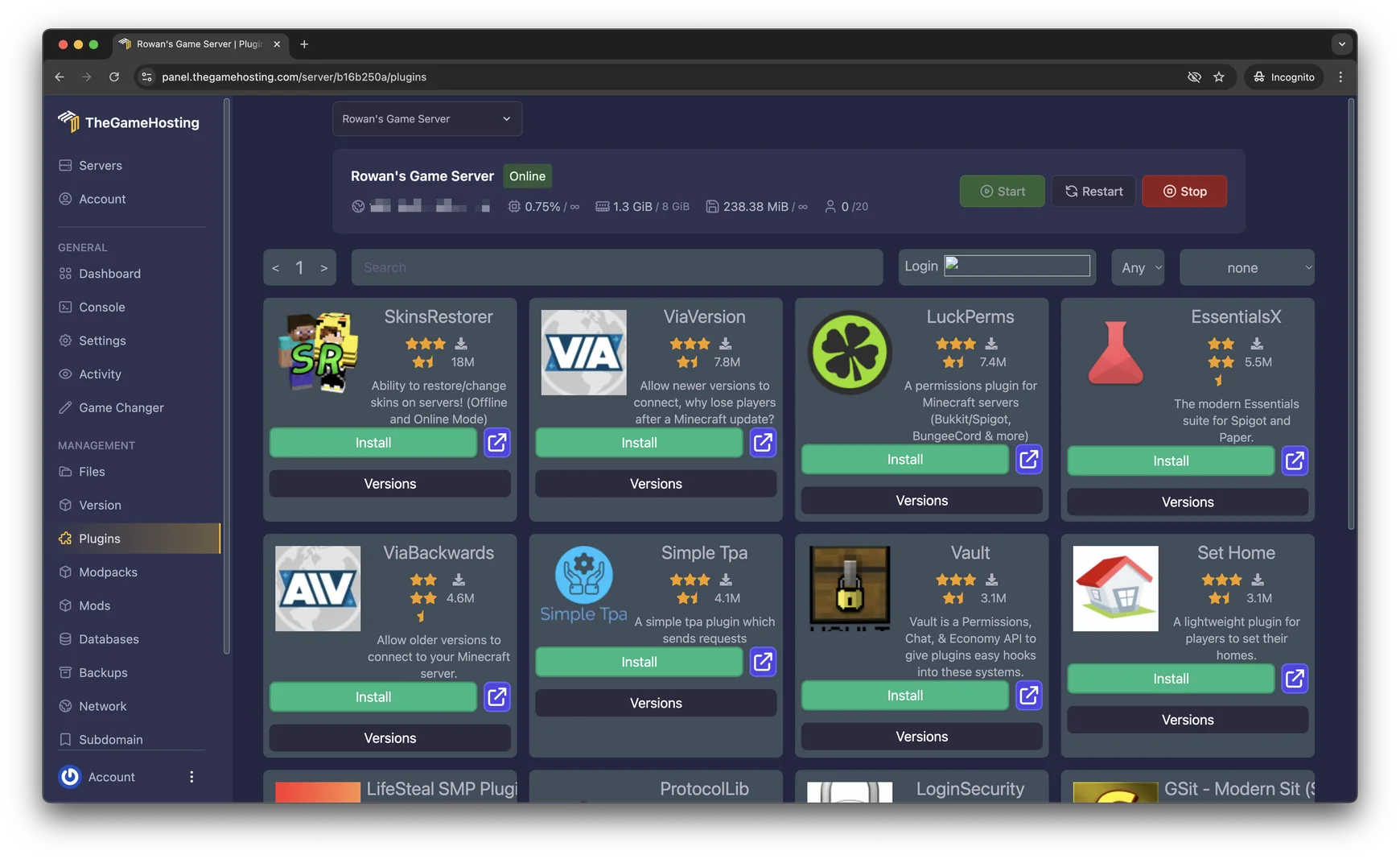
pluginsormodsfolder is created on the first start. If you still run vanilla, switch to Paper first in Version (see how to install Paper). - Add the jar. On TheGameHosting, the quick way is Plugins (Plugin Installer): search “LuckPerms” and install it without uploading anything. Or download the jar and upload it in Files to
/plugins(or/modson Fabric), or by sFTP. If an older LuckPerms jar is there, delete it so only one copy remains. - On Fabric, add Fabric API too. The Fabric build of LuckPerms depends on Fabric API, so both jars go in
mods. - Fully restart. Use Restart in the panel or type
stopand start again. Avoid/reload: a clean start is what lets LuckPerms create its files. - Check the console. In Console, look for LuckPerms enabling without errors. The plugin creates a
LuckPermsfolder withconfig.yml(on Fabric, the config lives in theconfigfolder asluckperms.conf). - Give yourself access. Right after install, nobody can use LuckPerms commands. In the panel Console, without a slash, run the command below with your exact username.
lp user YourName permission set luckperms.* trueNow /lp works for you in game. Run /lp info to confirm the version and the storage type it is using.
Storage: keep H2 or move to MySQL
By default LuckPerms saves everything in a local H2 database file inside its folder (storage-method: h2). That is the right choice for a single server: nothing to set up, and it works the moment the plugin starts. Do not delete that .mv.db file, because it holds all your groups and permissions.
You need a remote database such as MySQL only when two or more servers should share the same ranks, for example a survival and a creative server behind a proxy. On TheGameHosting every plan includes two databases, so you do not need to rent one elsewhere:
- Create the database. In the panel open Databases and create one. The panel shows the endpoint (host and port), database name, username and password.
- Edit the config. In Files, open
plugins/LuckPerms/config.yml, setstorage-method: mysqland fill in thedata:section. - Restart and confirm. The console should print
Loading storage provider... [MYSQL]with no errors after it.
storage-method: mysql

data:
  address: HOST:PORT
  database: DATABASE_NAME
  username: USERNAME
  password: 'PASSWORD'
Heads-up: switching storage does not move your existing data by itself. Make the change right after install, or export first with /lp export and import into the new storage with /lp import.
Use the web editor instead of long commands
Once you have luckperms.*, run /lp editor. LuckPerms replies with a link that opens an editor in your browser, where you can add groups, permissions, parents and prefixes with autocomplete. Nothing needs to be hosted on your side.
- Run
/lp editorin game orlp editorin the Console. - Open the link and make your changes.
- Click Save. The editor shows a command (it starts with
/lp applyedits); copy it and run it on the server to apply the changes.
The editor and the commands do the same thing, so use whichever you prefer. The next guide, Minecraft server permissions with LuckPerms, shows the command version step by step, and how to install EssentialsX covers the plugin whose commands you will most likely be handing out.
If LuckPerms doesn’t load
- No LuckPerms line in the console: the jar is in the wrong folder, or it is the wrong platform build (Bukkit jar on Fabric, or the other way around).
- “You do not have permission” on
/lp: you skipped the console command, or typed a different username. Run it again from the Console and check the spelling of your name. - Errors about downloading libraries: the first start needs internet access. On a hosted server this is already the case.
- Permissions act strangely: another permissions plugin is installed. Remove it so LuckPerms is the only one.
- MySQL fails to connect: check the address includes the port from the panel and that the password is in quotes if it has special characters.
If you want to give full rights to a trusted friend quickly, plain OP still works for vanilla commands: see how to OP someone. For anything bigger than a few friends, groups in LuckPerms are cleaner.
Install LuckPerms in one click on TheGameHosting
On TheGameHosting you switch to Paper or Purpur in Version, add LuckPerms from Plugins, restart from the panel and run the setup command in Console, all from a browser or your phone. Two included databases cover a MySQL setup for networks, Backups saves a copy before big permission changes, and Users lets a co-admin into the panel without sharing your password. The server runs 24/7 in Dallas or Amsterdam with DDoS protection, ready about 60 seconds after payment.
See the Minecraft server hosting page or compare RAM on plans and pricing, from $1.90 USD/month. Use the code FULL2026 for 15% off for life.
FAQ
Where do I put the LuckPerms jar?
In the plugins folder for Paper, Purpur, Spigot or Bukkit, and in the mods folder for Fabric, NeoForge or Forge. Start the server once first so the folder exists, then restart after adding the jar.
Does LuckPerms work on Fabric?
Yes. Download the Fabric build from luckperms.net and put it in mods together with Fabric API, which it depends on. Its config is luckperms.conf inside the config folder.
Why does /lp say I have no permission?
Right after install, nobody has access. Run lp user YourName permission set luckperms.* true in the server console, without a slash, with your exact username.
Do I need MySQL for LuckPerms?
No. The default H2 file works for a single server. You only need MySQL when several servers share ranks. On TheGameHosting you can create one in Databases.
Hosting for these games
 Minecraft Java hostingPaper, Purpur, Fabric, Forge and more
 Minecraft Bedrock hostingPhones, consoles and Windows
Written by TheGameHosting Team, the people who run our servers in Dallas and Amsterdam and answer your tickets.
All posts