 TheGameHosting Team

The safest way to backup Minecraft server world files is to stop the server, copy the world folders somewhere else and start it again. If players are online, run save-off and save-all flush in the console first, copy the folders, then run save-on. On TheGameHosting you skip the copying: open Backups and click Create backup.
A backup is what lets you undo a griefed base, a corrupted chunk, a bad plugin or an update that went wrong. It only helps if it contains the right folders and was taken while the game was not writing to them. This guide covers both, by hand and in the panel.
Which folders hold your Minecraft world
The world lives in the folder named by level-name in server.properties (default world). Where the Nether and the End go depends on the server software and the Minecraft version, because Minecraft 26.1 moved every dimension into world/dimensions/ and Paper followed the same layout.
| Server software | Up to 1.21.x | 26.1 and newer |
|---|---|---|
| Vanilla, Fabric, Forge, NeoForge | One folder: world (Nether in world/DIM-1, End in world/DIM1) | One folder: world (dimensions in world/dimensions/minecraft/) |
| Paper, Purpur, Spigot | Three folders: world, world_nether, world_the_end | Paper: one folder, world, with every dimension inside |
If you are not sure, look at the server root: back up every folder whose name starts with your level-name. Copying only world on an older Paper server is the classic mistake that makes the Nether and the End look reset after a restore. Player inventories, advancements and stats are saved inside the world folder too, so they travel with it.
For a complete server backup, also copy server.properties, whitelist.json, ops.json, banned-players.json and the plugins/, mods/ and config/ folders if you use them. They sit in the server root, not in the world.
How to backup Minecraft server world files with the server stopped
This is the most reliable method because nothing is writing to the world while you copy it.
- Warn your players and type
stopin the console. Wait until the log shows the server has finished saving and closed. - Find the world folders from the table above, using the name set in
level-name. - Copy them to another place: another drive, your PC or cloud storage. A copy on the same disk does not survive a disk failure.
- Compress and name the copy with the date, for example
world-2026-11-11.zip, so you can tell backups apart later. - Start the server again and check that it loads normally.
Backing up while players are online
Minecraft keeps writing chunks while it runs, so a copy taken in the middle of a save can end up half-written. The save commands exist for exactly this. Run them in the server console (no slash needed there) or in game as an operator with permission level 4:
save-off
save-all flush
# copy the world folders now
save-onsave-offstops the server writing to the world files. Changes are kept in memory meanwhile.save-all flushwrites every loaded chunk and player to disk right away. The server can freeze for a moment while it does this.- Copy the world folders while saving is off.
save-onturns automatic saving back on. Do not forget it: if the server crashes while saving is off, everything since the backup is lost.
Heads-up: save-off resets when the server restarts, so a restart also turns saving back on. Plugins with their own databases (economy, land claims) are not covered by these commands. Back up their folder too, ideally with the server stopped.
How to back up in the TheGameHosting panel
Every TheGameHosting plan includes a backup system, so you do not have to copy folders by hand:
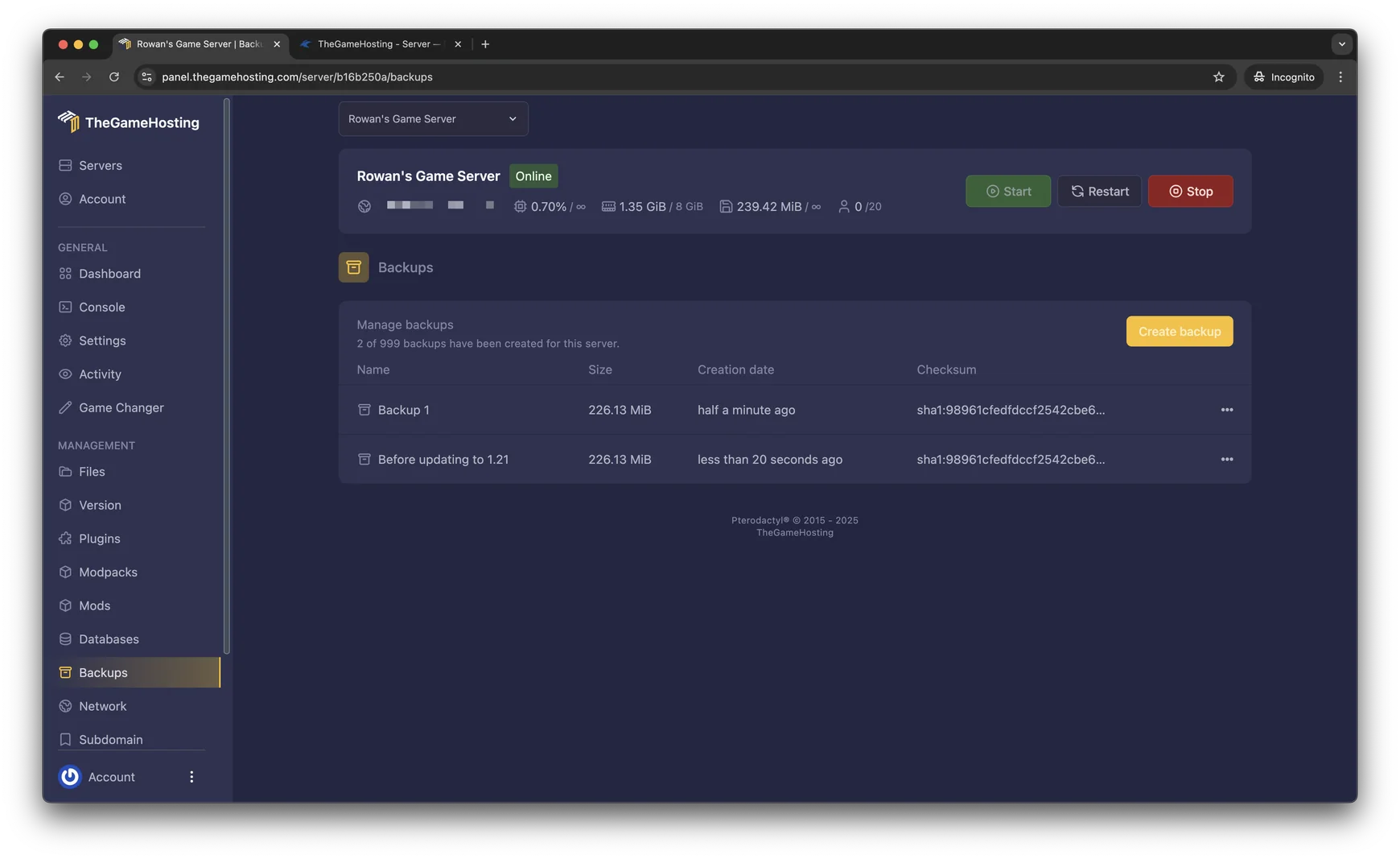
- Open your server in the panel and go to Backups.
- Click Create backup and give it a clear name, such as “Before 26.1 update” or “Before world reset”.
- Wait until it appears in the list with its name, size and date. Big worlds take longer.
- To automate it, open Schedules, create a schedule and add a Create backup task at the time you want.
- For an extra copy outside the server, download the world folders over sFTP to your PC.
The backup includes the server files, not just the world, so plugins and configs come along. If you run the server with a friend, add them in Users so they can make backups too without sharing your account. When you need it back, follow our guide to restore a Minecraft server world.
When to back up and how many to keep
- Before every update. A world saved by a newer version cannot safely go back to an older one. Our Minecraft server update guide starts with a backup for that reason.
- Before installing plugins, mods or a modpack, and before a world reset or a seed change.
- On a schedule on active servers. Daily is a good start for an SMP where people build every day.
- Keep several, not one. Griefing or a corrupted chunk is sometimes noticed days later, and only an older backup still has the good version.
- Test a restore once. A backup you have never restored is a guess.
Keep your world safe on TheGameHosting
On a Minecraft server from TheGameHosting you back up with one click, automate it in Schedules and restore from the same page. The server runs 24/7 on AMD 9950X/7950X3D with DDR5 and NVMe in Dallas or Amsterdam, and every plan from 2 GB to 64 GB includes DDoS protection and full sFTP. See the plans and pricing and use code FULL2026 for 15% off for life.
FAQ
How do I backup a Minecraft server automatically?
On TheGameHosting, open Schedules, create a schedule and add a Create backup task. On your own machine you need a script that runs save-off, save-all flush, copies the world folders and runs save-on, triggered by a scheduler.
Which files do I need to back up on a Minecraft server?
The world folder named in level-name, plus world_nether and world_the_end on Paper, Purpur or Spigot before 26.1. For a full server backup add server.properties, whitelist.json, ops.json, banned-players.json and your plugins/, mods/ and config/ folders.
Can I back up a Minecraft server while it is running?
Yes, if you run save-off and save-all flush before copying and save-on afterwards. Copying without them can capture chunks that were half-saved.
Do backups include player inventories?
Yes. Inventories, advancements and stats are stored inside the world folder, so a world backup restores them to the moment it was taken.
Hosting for these games
 Minecraft Java hostingPaper, Purpur, Fabric, Forge and more
 Minecraft Bedrock hostingPhones, consoles and Windows
Written by TheGameHosting Team, the people who run our servers in Dallas and Amsterdam and answer your tickets.
All posts