
Space Engineers dedicated server

Space Engineers Server Hosting

Space Engineers server hosting that keeps your world online around the clock, so your crew can mine, weld and fight even when you log off. The dedicated server runs on AMD 9950X/7950X3D CPUs with DDR5 RAM and is ready within 60 seconds after payment.

  • Steam Workshop mods
  • Upload your own world
  • Full sFTP access
  • Unlimited slots

Plans from $6.96 USD / month

Space Engineers key art: four engineers in spacesuits beside a green and white ship in an asteroid hangar

Space EngineersRequires 8 GB RAM · runs on 6 of 9 plans

Before you launchWhat a Space Engineers server needs, in plain numbers

  • 8 GB RAM minimum6 of 9 plans, from $6.96 USD
  • Fast cores, steady sim speedUp to 5.7Ghz per core
  • Steam Workshop modsAdded by ID in the world config
  • Unlimited slotsRAM sets the limit, not us

Use code FULL2026 at checkout for 15% off for life

Swipe or tap a plan

Slide to pick your RAM Use the arrow keys too

Every plan includes

    Run your Space Engineers server from the browser

    Real screenshots of the panel you get. Start, stop and back up your world without a remote desktop.

    File Manager in the TheGameHosting panel with the server's folders, a search box and upload buttons

    Try the live panel demoWant to click around first? The demo on our home page shows the same panel in your browser.

    Everything included with your Space Engineers server

    Every plan has the full panel and the same hardware. The only thing you pick is the RAM.

    Built for engineers

    • Steam Workshop modsSpace Engineers dedicated servers load Workshop mods by their ID.
    • Bring your own worldUpload a save from your PC over sFTP and keep building.
    • Unlimited slotsWe set no player cap. Your RAM decides.
    • Online 24/7Your grids keep their place while you are offline.

    Manage it easily

    • File manager and full sFTPChange configs in the browser or transfer large saves over sFTP.
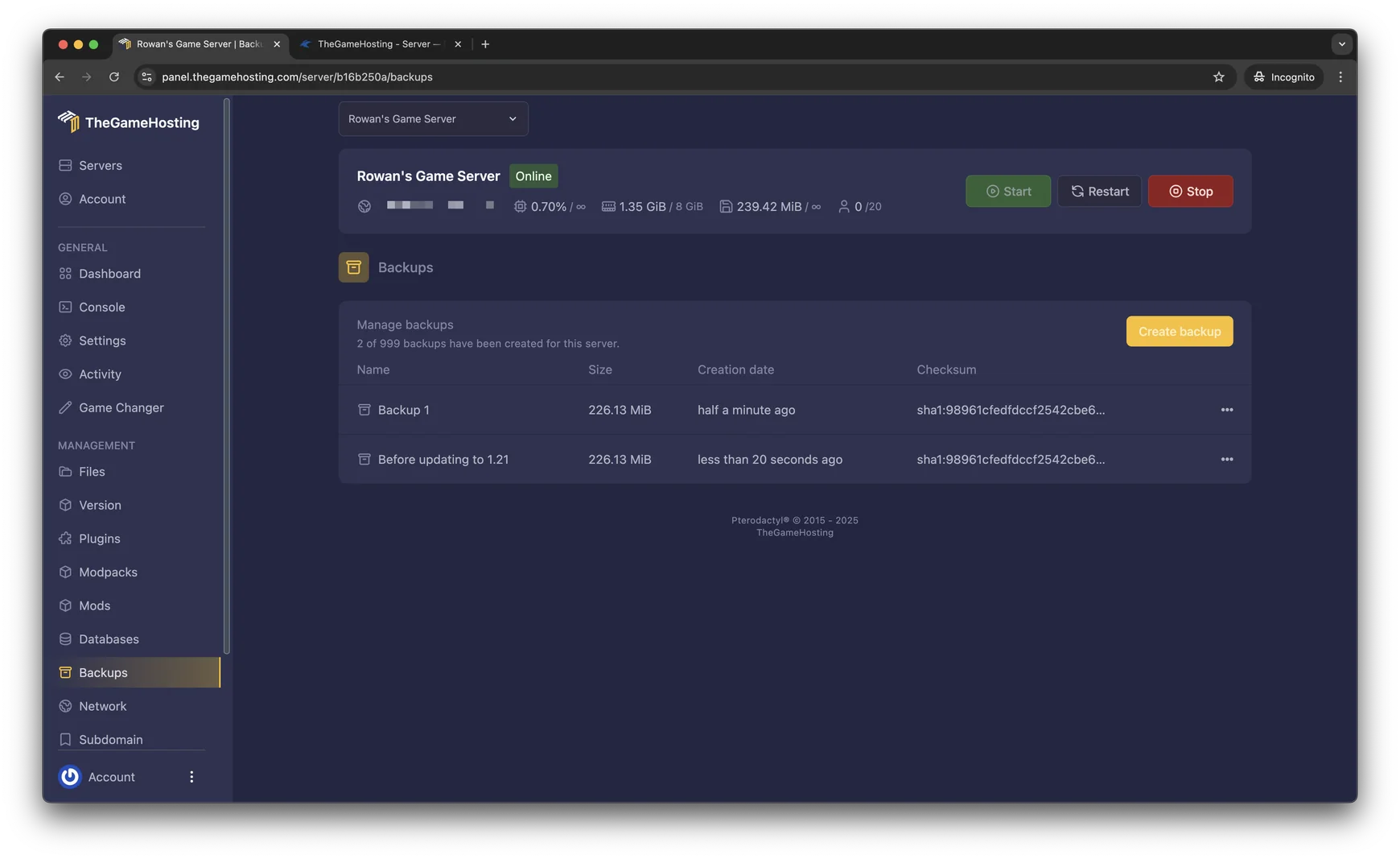
    • Backup SystemCreate a backup and restore it from the panel.
    • Game ChangerMove the same plan to another game whenever you like.
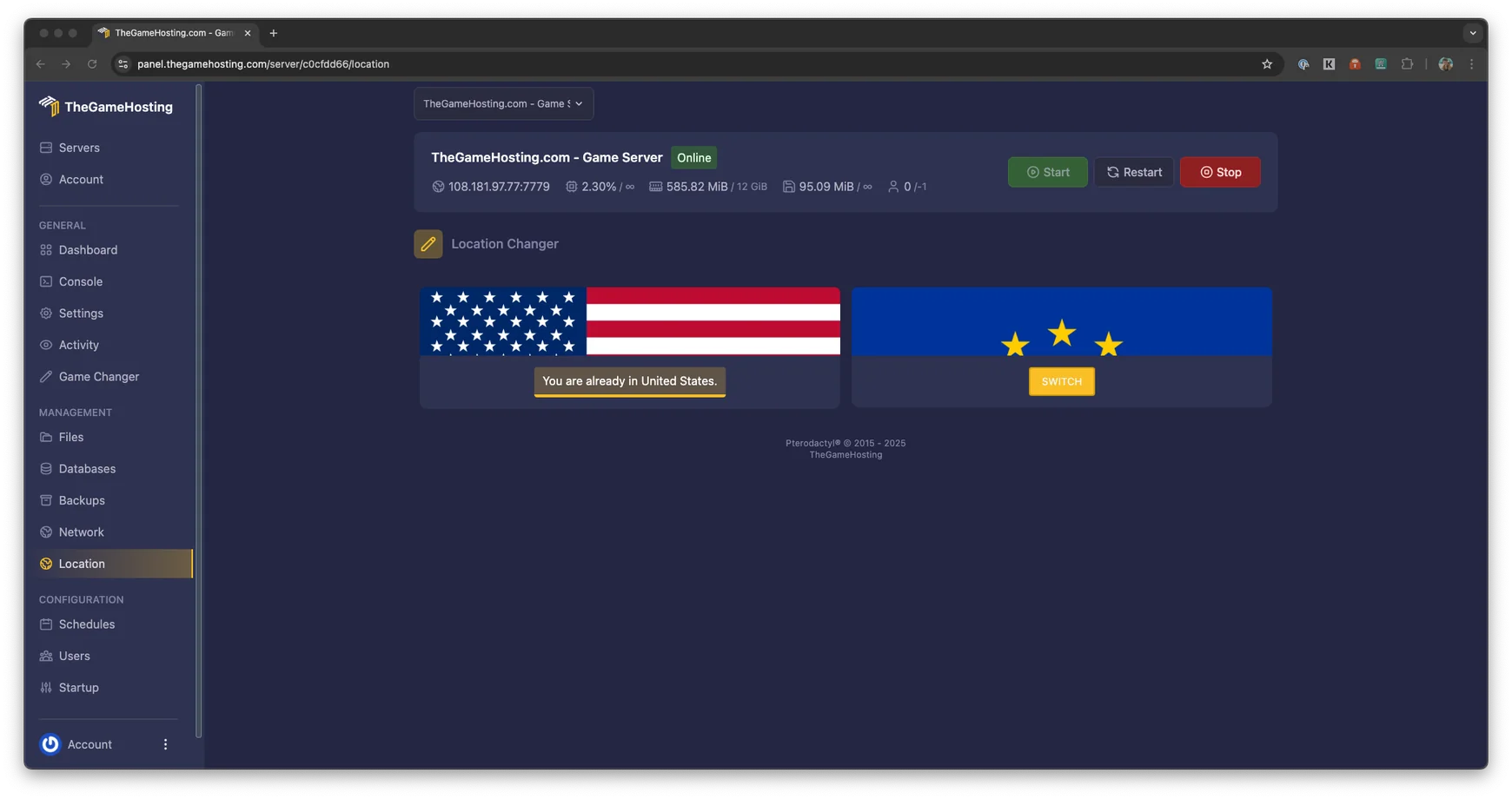
    • US and Europe locationsDallas, TX and Amsterdam, NL.

    Fast and protected

    • AMD 9950X/7950X3DUp to 5.7Ghz for the physics behind sim speed.
    • DDR5 RAM and NVMeDedicated DDR5 memory and Samsung NVMe for quick world loads.
    • DDoS protectionEvery server sits behind our DDoS protection.
    • Ready in 60 secondsYour server is ready within 60 seconds after payment.

    Space Engineers server hosting without a spare PC

    Hosting a world from your own game means it vanishes the moment you log off, and everyone else plays at the mercy of your connection. A Space Engineers dedicated server fixes both. The world runs on its own machine, so friends can mine, refine and weld while you are away, and nobody has to leave a PC on all night.

    With TheGameHosting the server is ready within 60 seconds after payment. Space Engineers needs at least 8 GB of RAM, so it starts on our 8 GB plan at $6.96 USD a month, with unlimited slots, full sFTP access and DDoS protection included.

    Space Engineers screenshot: two astronauts on a station above a blue planet, with ships and asteroids around them

    Steam Workshop mods and your own saves

    Most long-running Space Engineers servers end up with a few mods: extra blocks, weapons, quality-of-life tweaks or new planets. The dedicated server reads Workshop items by their ID from the world configuration and downloads them when it starts, and players receive the same mods when they join.

    How to add mods to a Space Engineers dedicated server

    Stop the server, open the world configuration in the file manager, add the Workshop IDs of the mods you want and start it again. Take a backup first: removing a mod later can leave missing blocks behind in the world.

    Upload an existing world

    Started a save in single player? Copy the world folder from your PC, upload it and point the server at it. Large worlds with hundreds of grids go up faster over sFTP than through the browser.

    Space Engineers screenshot: a large ship flying over a grassy planet while a rover drives below
    Backups page in the TheGameHosting panel listing two backups with their size, creation date and checksum
    Location Changer in the TheGameHosting panel: the server runs in the United States, with a Switch button for Europe

    Keeping sim speed close to 1.0

    Sim speed is the number every Space Engineers admin watches. At 1.0 the game runs in real time. Below that, ships drift, pistons stutter and everything feels slow. It drops when the server has more physics to calculate than it can keep up with, usually from many moving grids, collisions, rotors and pistons.

    • Set PCU and block limits in the world settings, so one player can't build a lag machine.
    • Clear out abandoned grids and floating objects from time to time.
    • Keep programmable block scripts that run every tick to a minimum.

    Our AMD 9950X/7950X3D processors run up to 5.7Ghz, so the simulation has fast cores to work with. And when your group wants a change of scenery, the Game Changer moves the same plan to Empyrion: Galactic Survival or Stationeers. Back up your world before you switch.

    Space Engineers cover art: an astronaut in a red spacesuit holding a tool

    How much RAM does a Space Engineers server need?

    Space Engineers needs at least 8 GB of RAM on our servers, so 6 of our 9 plans run it, from 8 GB up to 64 GB. Memory use grows with the world itself more than with the player count:

    • A fresh survival world with a few friends and a handful of ships fits on the 8 GB plan.
    • Planets, large stations and a growing grid count all add memory as the months go by.
    • Mod-heavy servers and big factions need room to grow, so move up the slider.

    We don't cap slots, so RAM and the number of grids set your ceiling. Not sure where to start? Tell our support team what you plan to build and we will suggest a size.

    TheGameHosting 3D character in a yellow hoodie holding a game controller

    Space Engineers requires 8 GB RAM6 of our 9 plans run it, from 8 GB

    • 8 GB
    • 10 GB
    • 12 GB
    • 16 GB
    • 32 GB
    • 64 GB

    Hardware we own, in Dallas and Amsterdam

    Your station runs on servers we bought and look after ourselves, not on rented capacity. Space Engineers calculates physics for every moving grid, so it rewards fast cores: every plan runs on AMD 9950X/7950X3D processors up to 5.7Ghz, with DDR5 RAM and Samsung NVMe storage for quick saves and world loads.

    Pick Dallas, TX (United States) or Amsterdam (Netherlands) for your server. Both sites sit on a 10 Gbps network with advanced cooling, UPS backup power and DDoS protection in front of every server.

    • AMD 9950X/7950X3D up to 5.7Ghz
    • DDR5 RAM
    • Samsung NVMe Storage
    • 10 Gbps Network
    • UPS Backup Power
    • Dallas, TX & Amsterdam, NL

    Real people on support

    Our team is available 24/7/365. Ask about a mod that will not load, a world that will not start or moving a save from your PC, and a person answers.

    • Live chat
    • Email
    • Ticket system
    Contact support

    Space Engineers server questions

    Can't find your answer? Ask our support team.

    How fast is my Space Engineers server ready?

    Within 60 seconds after payment. The access details arrive by email and you can start the server from the panel straight away.

    How much RAM does a Space Engineers server need?

    Space Engineers needs at least 8 GB of RAM on our servers, so it starts on the 8 GB plan at $6.96 USD a month. Planets, large stations, many grids and mods all use more memory, so busy or modded servers do better on a bigger plan.

    Can I use Steam Workshop mods?

    Yes. Space Engineers dedicated servers load Steam Workshop mods listed by ID in the world configuration and download them at startup. You can edit that configuration in our file manager or over sFTP. Take a backup before adding or removing mods.

    Can I upload my single-player world?

    Yes. Copy the world folder from your PC, upload it through the file manager or over sFTP and set the server to load it. If the world does not start, our support team can take a look.

    What is sim speed and how do I keep it high?

    Sim speed shows how fast the server runs the game compared with real time, where 1.0 is full speed. It drops when there is more physics to calculate than the server can handle. PCU and block limits, regular clean-ups of old grids and fewer scripts running every tick keep it close to 1.0.

    How many players can join my server?

    We do not limit slots. The player limit in your server settings and your RAM decide how many engineers fit, and the number of large grids matters more than the number of players.

    Can I switch to another game later?

    Yes. The Game Changer in the panel moves your plan to another game it runs, such as Empyrion: Galactic Survival or Stationeers, with nothing new to buy. Make a backup before you switch.

    Where are your Space Engineers servers hosted?

    In Dallas, TX (United States) and Amsterdam (Netherlands), on hardware we own in both places: AMD 9950X/7950X3D CPUs, DDR5 RAM, Samsung NVMe storage and a 10 Gbps network.

    Do you have a discount code?

    Use promo code FULL2026 at checkout for 15% off for life.

    Is TheGameHosting affiliated with Keen Software House?

    No. This site is not affiliated with Keen Software House, the developer of Space Engineers.

    Launch your Space Engineers server today

    Ready within 60 seconds after payment, on the same plan that runs every other game on our list.

    Use promo code FULL2026 at checkout for 15% off for life.