 TheGameHosting Team
To make a Minecraft Bedrock server, download the free Bedrock Dedicated Server from Mojang, unzip it, run bedrock_server and give your friends your address and port 19132. It runs on Windows and Ubuntu. If you want it online all day without touching your router, host it on TheGameHosting instead.
What you need to make a Bedrock server
- A computer that can run the server. Mojang's Bedrock Dedicated Server guide lists Windows 10 (version 1703) or later, Windows Server 2016 or later, and Ubuntu, the only officially supported Linux distribution.
- Minecraft Bedrock Edition on every player's device: phones, tablets, Windows or consoles. Java Edition players cannot join a Bedrock server by default (here is why and what the workaround is).
- Access to your router, if friends will join from outside your home network.
Make a Bedrock server on your own PC
The Bedrock Dedicated Server (BDS) is a free download from Mojang. These steps work on Windows and on Ubuntu.
- Download the server
.zipfor your system from Mojang's Bedrock server page. Take the normal release, not the Preview server: the Preview build is not compatible with the full release of the game. - Unzip it into an empty folder, for example
C:\MinecraftServeror~/MinecraftServer. - Start it. On Windows, open PowerShell in that folder and run the executable. On Ubuntu, run the command below.
- The first start creates
server.propertiesand aworldsfolder. Stop the server by typingstopin its window, so the world saves cleanly.
.\bedrock_server.exeLD_LIBRARY_PATH=. ./bedrock_serverWhen the server says it has started, you can join from the same computer with Minecraft Bedrock. Use 127.0.0.1 as the address and 19132 as the port (the steps are in how to add a server in Minecraft Bedrock).
The server.properties settings worth changing
Open server.properties in a text editor, change a value, save and restart the server. These are the settings most owners touch first. The defaults below are the ones in the Bedrock server 1.26.62.1 file, as of November 2026, according to the Minecraft Wiki.
| Setting | Default | What it does |
|---|---|---|
server-name | Dedicated Server | The name players see in the server list. |
gamemode | survival | survival, creative or adventure for new players. |
difficulty | easy | peaceful, easy, normal or hard. |
allow-cheats | false | Lets operators use cheat commands. |
max-players | 10 | How many players can be online at once. |
allow-list | true | Only players on the allowlist can join (more below). |
level-name | Bedrock level | The world folder inside worlds. Change it to load another world. |
level-seed | (blank) | The seed for a new world. Blank gives a random one. |
view-distance | 32 | How far players can see, in chunks. Lower it if the server struggles. |
tick-distance | 4 | How far from a player the world keeps updating, from 4 to 12. |
online-mode | true | Checks that players are signed in to Xbox. Leave it on. |
Allowlist and operators
With allow-list=true, only the Gamertags on the allowlist can join. Add a friend from the server console:
allowlist add MyFriendGamertagPut names with spaces in quotes. The list lives in allowlist.json; if you edit that file by hand, run allowlist reload. To give yourself operator rights, type this in the console:
op MyGamertagOperators can use commands in game. Cheat commands also need allow-cheats=true. For finer control, permissions.json accepts the levels operator, member and visitor per player, and permission reload applies your changes.
Let friends join: ports and your router
Your friends need your public IP address and the server port. The default port is 19132. Since Bedrock 26.50 the server's default transport is NetherNet, and Bedrock 26.60 deprecated the old RakNet transport, so it needs the port open for both TCP and UDP. The older transport used UDP only. The default file looks like this:
server-port=19132
server-udp-ports=19132
transport=nethernet- Give the PC a fixed local IP address in your router.
- Forward port
19132, TCP and UDP, to that PC. If your router only lets you pick one type, create two rules. - Allow the server through the Windows firewall when it asks, or on Ubuntu run
sudo ufw allow 19132. - Share your public IP address, not the one that starts with 192.168. Your friends enter it in Minecraft.
This works, but it comes with limits that matter once you run it for more than an evening:
- It only exists while the PC is on. Switch it off and your friends lose the world.
- You host and play on one machine, so the server competes with Minecraft for the same CPU and RAM.
- Your home connection carries everyone. A changing IP address and a slow upload limit who can join and how smoothly.
- Console players cannot type an address. They need extra steps, covered in how to join a Bedrock server on Xbox, PlayStation and Switch.
If friends still cannot see the server after this, work through Minecraft Bedrock server not showing up.
Make a Bedrock server on TheGameHosting
Hosting your server with us follows the same ideas in a different place. There is no router and no port forwarding on your side, and the world stays online when your PC is off.
- Open Minecraft Bedrock server hosting and pick a plan. Bedrock needs only 1 GB of RAM, so it runs on all nine plans; the plans page lists every size from 2 GB to 64 GB.
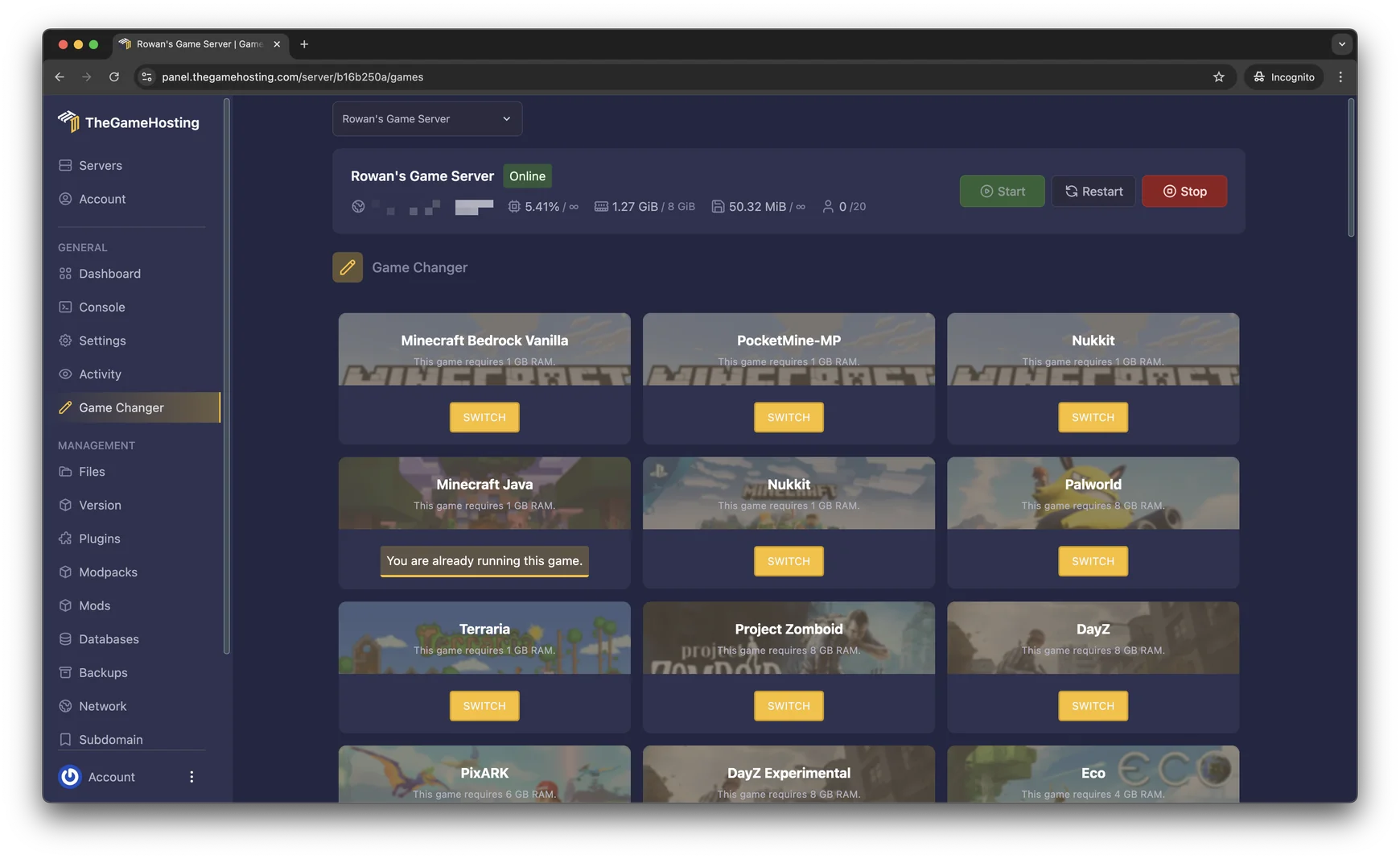
- Open your server in the panel. If it is set to another game, go to Game Changer and switch to Minecraft Bedrock Vanilla, Mojang's official server. Make a backup first if the server already holds a world you want to keep.
- Open Files and edit
server.propertiesin the browser: name, game mode, difficulty andmax-players. Restart the server from the panel. - Use the Console for
allowlist addandop, exactly as above. - Copy the server address and port from the panel and send them to your friends.
Have a world from your own PC? Upload it from the File Manager, or over sFTP if the folder is big. The panel also has a Backup System you can run before an update or a new add-on, and a Location Changer between Dallas and Amsterdam so you can sit closer to your players. Want add-ons next? Read how to install add-ons on a Minecraft Bedrock server.
Still deciding between editions? Bedrock vs Java server compares them, and the best Bedrock server software explains the three options in our Game Changer.
FAQ
Is the Bedrock Dedicated Server free?
Yes. Mojang gives the Bedrock Dedicated Server away as a free download for Windows and Ubuntu. What costs money is the machine that runs it: your own PC and electricity, or a hosting plan that keeps it online all day.
What port does a Minecraft Bedrock server use?
The default port is 19132. Since NetherNet became the default transport in Bedrock 26.50, the server needs that port open for both TCP and UDP. On a hosting plan the port is already set up for you and shown in the panel.
Can Java players join my Bedrock server?
Not by default. Java and Bedrock use different protocols. To let Bedrock players join a Java server you can use Geyser, but there is no official way for Java players to join a Bedrock server.
Can I use mods or plugins on a Bedrock server?
The official Bedrock Dedicated Server has poor support for community mods and plugins. It runs add-ons made of behavior packs and resource packs, and it supports Mojang's Scripting API. Java mods and plugins do not work on it.
How many players can a Bedrock server hold?
The default max-players value is 10 and you can set any positive number. The real limit is the RAM and CPU of the machine. On TheGameHosting there is no slot limit from us, so your plan size sets the ceiling.
Hosting for these games
 Minecraft Bedrock hostingPhones, consoles and Windows
 Minecraft Java hostingPaper, Purpur, Fabric, Forge and more
Written by TheGameHosting Team, the people who run our servers in Dallas and Amsterdam and answer your tickets.
All posts