 TheGameHosting Team
Host a Java server if you want plugins, mods and modpacks. Host a Bedrock server if your players are on consoles, phones or Windows and you want a simple world that runs with little setup. A Java server with Geyser can serve both groups. Your players' devices should make the call.
Bedrock vs Java server, side by side
| Bedrock server | Java server | |
|---|---|---|
| Players join from | Windows, phones, tablets, Xbox, PlayStation and Switch. | Windows, Mac and Linux. |
| Server software | Mojang's Bedrock Dedicated Server, plus PocketMine-MP and Nukkit. | Vanilla, Paper, Purpur, Fabric, Forge, NeoForge and many more. |
| Customising | Add-ons (behavior and resource packs) and the Scripting API. | Plugins, mods and modpacks. |
| Default port | 19132 | 25565 |
| Default max players | 10 | 20 |
| Console players | Join through a helper such as BedrockConnect. | Cannot join, unless the server runs Geyser. |
| Add Server button | On Windows and mobile. Not on consoles. | On every Java client. |
Mojang's default player counts come from each edition's server.properties file; you can raise both. The table is a summary, and the sections below explain the differences that matter.
Start with the devices your players own
This is the question that settles most cases. Java Edition is a PC game. Bedrock Edition is the one on phones, tablets, consoles and the Windows store. If your friends are on an Xbox, a PlayStation or a Switch, they can only play Bedrock. If everyone is on a PC and wants mods, Java is the natural choice.
Two editions on one PC is possible, since Minecraft sells a Java and Bedrock bundle for Windows, but the two still run as separate games with separate servers. If your group is a mix, jump to the crossplay section.
How much work each one takes
A vanilla Bedrock server is the shorter job. You download one program, edit server.properties, add names to the allowlist and share the address. A Java server is just as easy to start, but it gives you more to decide: which platform, which plugins, which Java settings and how much memory. That extra work is what buys you the customisation below. On a hosting panel, most of those steps become clicks in the Version Changer and the installers.
How much you can customise
This is where Java pulls ahead. The Java side has a huge range of server software. Our Version Changer lists 28+ platforms: Vanilla, Paper, Purpur, Spigot, Folia, Fabric, Forge, NeoForge, proxies and hybrid platforms that load both mods and plugins, and you can upload your own JAR. Plugin, mod and modpack installers sit in the panel. For a tour of the choices, see Paper, Purpur or Fabric: which Minecraft server software.
On Bedrock, the official server has poor support for community mods and plugins, according to the Minecraft Wiki. You customise it with add-ons, which change mobs, items and visuals, and with scripts through Mojang's Scripting API. The steps are in how to install add-ons on a Minecraft Bedrock server. Community servers such as PocketMine-MP and Nukkit add plugins, with trade-offs covered in the best Minecraft Bedrock server software.
Crossplay: can one server serve both?
Yes, but only in one direction. A Java server running Geyser and Floodgate accepts Bedrock players. A Bedrock server cannot accept Java players. If you want everyone on one world, host Java and add Geyser. Can Java and Bedrock play together explains the details and the Geyser and Floodgate setup guide walks through it. The price is a few limits for Bedrock players, such as no client-side mods.
Which one to pick
- Choose Bedrock if your group plays on consoles, phones or tablets, you want vanilla survival or a few add-ons, and you would rather not manage plugins. How to make a Minecraft Bedrock server shows how little there is to set up.
- Choose Java if you want plugins like economies and land protection, big modpacks, or custom game modes. How to make a Minecraft Java server covers it.
- Choose Java plus Geyser if you want Java's depth but have a few friends on consoles or phones.
- Switch later if you are unsure. Worlds are not converted between editions, so a switch means a new world, but the plan stays the same.
Four typical groups
- A family on tablets and a console: Bedrock. Everyone can join, and the owner has little to maintain.
- A friend group on PC who love mods: Java with Fabric or Forge, and a modpack.
- A public survival community with ranks and land protection: Java with Paper and plugins. Add Geyser if you also want console players.
- A class or club on school devices: whichever edition the devices run. Check what is installed before you choose.
Host either edition on TheGameHosting
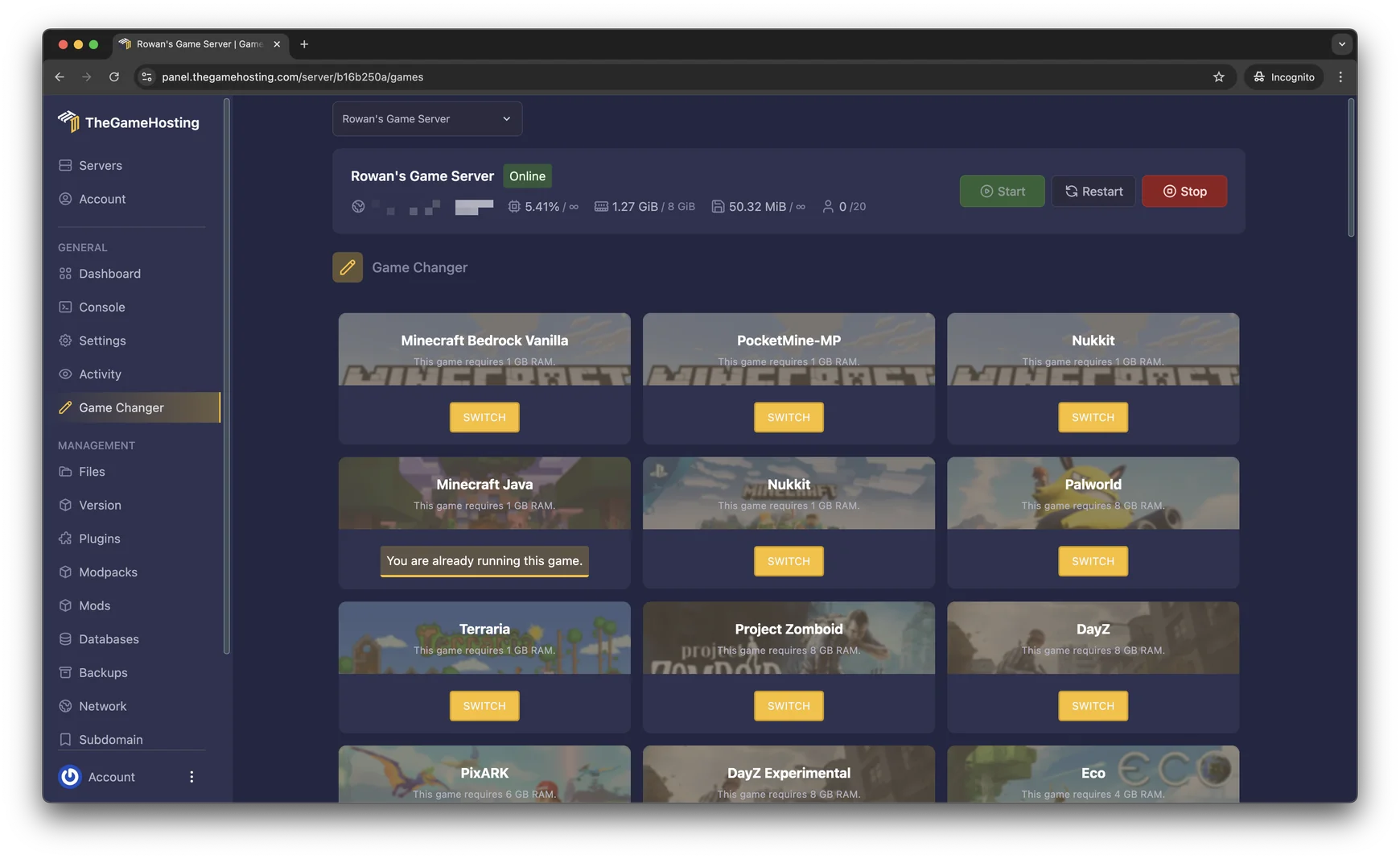
With us you do not pay twice to try both. One plan runs every game we host, and the Game Changer in the panel switches a server between Minecraft Bedrock Vanilla, PocketMine-MP, Nukkit and Minecraft Java. Our panel lists a 1 GB minimum for each of them.
- Pick a plan on Minecraft Bedrock server hosting or Minecraft Java server hosting. The plans page lists nine sizes, from 2 GB to 64 GB.
- Open Game Changer and choose the edition. Make a backup first, because a switch replaces the game's server files and does not convert the world.
- Use Files, Backups and Console the same way on either edition. Java servers add Version, Plugins, Mods and Modpacks to the side menu.
- Pick Dallas or Amsterdam, whichever is closer to most of your players.
Both editions need more RAM as the group and the content grow. For Java sizing, see how much RAM does a Minecraft server need.
FAQ
Is a Bedrock or a Java server better for friends on consoles?
A Bedrock server is the simple choice, because consoles only run Bedrock. A Java server with Geyser also works for console players, at the cost of a more involved setup and a few Java features that Bedrock players do not get.
Can a Bedrock server use plugins and mods?
The official Bedrock Dedicated Server has poor support for community mods and plugins. It runs add-ons and scripts instead. Community server software such as PocketMine-MP and Nukkit supports plugins, with their own trade-offs.
Which edition is easier to set up as a server?
Bedrock has fewer choices to make, so it is quicker for a vanilla world. Java gives you many more server platforms, plugins and mods to configure, which means more decisions but also more control.
Can I move my world from Java to Bedrock?
Not directly. The two editions store worlds in different formats, so switching means starting a new world or converting the old one with a third-party tool. Make a backup before you switch games in the panel.
Can I try both editions on one hosting plan?
Yes. On TheGameHosting one plan runs every game we host, and the Game Changer switches between Minecraft Bedrock and Minecraft Java. Back up first, because switching games replaces the server files.
Hosting for these games
 Minecraft Bedrock hostingPhones, consoles and Windows
 Minecraft Java hostingPaper, Purpur, Fabric, Forge and more
Written by TheGameHosting Team, the people who run our servers in Dallas and Amsterdam and answer your tickets.
All posts