 TheGameHosting Team
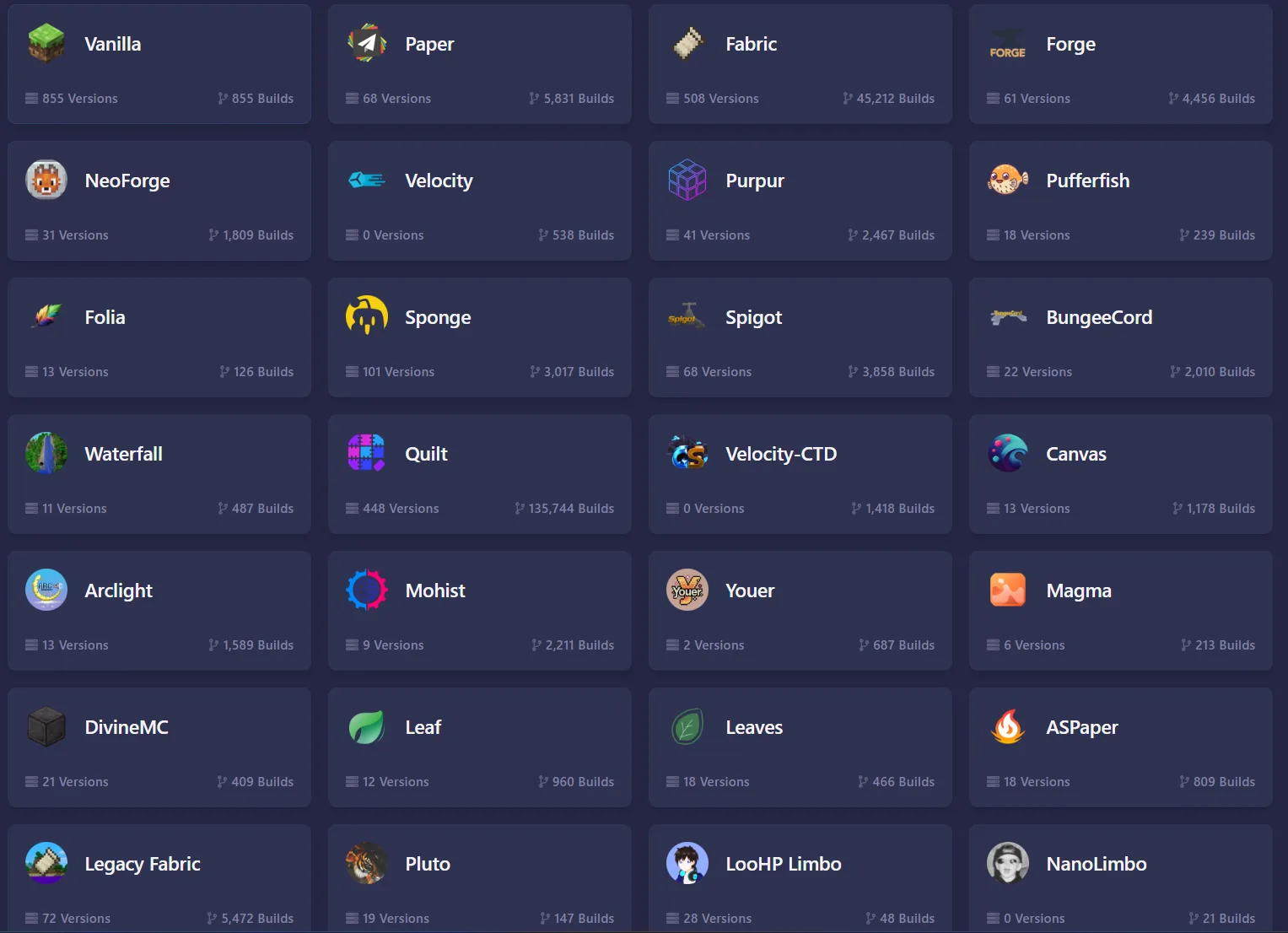
Choose Paper if you want plugins and good performance, Purpur if you also want many extra gameplay settings, and Fabric if you want mods that change the game itself. Paper and Purpur work with a normal Minecraft client. Fabric usually needs the same mods on every player’s computer.
Those three answer most questions, but the right pick depends on what your players expect. The table gives you the quick comparison and the sections below explain each platform, then show how to switch from the panel.
Paper, Purpur and Fabric at a glance
| Compare | Paper | Purpur | Fabric |
|---|---|---|---|
| Adds to your server | Plugins | Plugins, plus extra settings | Mods |
| Built on | Spigot | Paper | Its own mod loader |
| Players need | A normal Java client | A normal Java client | Usually the same mods |
| Best for | Survival, minigames, communities | Owners who want to tweak gameplay | New content, performance mods, modpacks |
| Watch out for | Small differences from vanilla behaviour | More settings to learn and test | A mod must match your Minecraft version |
Paper: the default for plugin servers
The PaperMC docs describe Paper as a high-performance server that aims to fix gameplay and mechanics inconsistencies. It is a fork of Spigot and a drop-in replacement for CraftBukkit and Spigot, so the huge catalogue of Bukkit and Spigot plugins runs on it. Paper also bundles the spark profiler since version 1.21, which you will use when the server lags.
It is not identical to vanilla. Paper’s own “Vanilla-like experience” page says you cannot get a 100 percent vanilla experience on Paper, and technical players who build redstone machines may notice differences. For most communities this does not matter.
If this is your pick, follow how to install plugins on a Paper server. Want friends on phones and consoles to join too? Geyser and Floodgate let Bedrock players connect to a Paper server: see how to set up Geyser and Floodgate for crossplay.
Purpur: Paper with more options
Purpur is software based on Paper. Its site says that it supports plugins written for the Bukkit, Spigot and Paper APIs, and that it focuses on giving server owners as much configurability as possible. In practice you get a lot more switches to change game rules, mob behaviour and small mechanics, without adding plugins.
More switches also mean more to test. Start on Paper if you are new, and move to Purpur when you have a specific setting in mind. Because Purpur supports Paper plugins, the move is low risk when you take a backup first.
Fabric: the mod loader
Fabric is a mod loader. Its homepage says the loader is the bare minimum: you add Fabric API to the mods folder, and most mods expect it. A Fabric server runs mods, not plugins, so your players usually need the same mods on their computers.
Fabric suits you if you want new blocks and mechanics, performance mods such as Lithium or FerriteCore, or a modpack. The setup is covered in how to install mods on a Minecraft server.
Performance and memory: what changes?
Paper and Purpur are built to run well out of the box, and both ship tools to see what a server is doing: Paper has bundled the spark profiler since 1.21 and exposes settings for chunk loading and mob spawning in its configuration files. Fabric itself stays light, and the speed-ups come from the mods you add, such as Lithium or FerriteCore.
Memory follows what you run. A plugin server for friends is happy with a few gigabytes, while a Fabric or Forge server with many mods, or a full modpack, needs a lot more. Our guide on how much RAM a Minecraft server needs gives starting sizes for each, and the spark profiler shows what slows the server down when TPS drops, whichever platform you chose.
What about the other platforms?
- Vanilla is the unmodified server from Mojang. It is fine for a small private world, but it cannot run plugins or mods.
- Forge and NeoForge are mod loaders like Fabric, used by many mods and modpacks. Pick the one your mods or modpack need.
- Spigot is the platform that Paper was built from. Choose it only when a plugin requires it.
- Folia is a Paper fork that adds regionised multithreading, aimed at very large servers. Plugins must be written to support it, so most small servers should not use it.
- Velocity is a proxy for linking several servers into one network. You do not need it for a single server.
Which one should you pick?
- Survival with friends, a few plugins: Paper.
- A community server with claims, ranks and an economy: Paper, with a permissions plugin.
- You want many gameplay settings changed: Purpur.
- You want new content or a specific modpack: Fabric, Forge or NeoForge, whichever the pack requires.
- You want the plain game: Vanilla.
Whatever you pick, size your plan to match. Mods and big player counts need more memory, as explained in how much RAM a Minecraft server needs.
How to switch platforms in the panel
- Make a backup first. In the panel, open Backups and click Create backup.
- Open Version in the side menu. This is the Version Changer.
- Choose the platform you want, for example Paper, Purpur or Fabric, then the Minecraft version.
- Click Install and start the server. Watch the console for errors.
- Install the add-ons for the new platform: plugins for Paper and Purpur, mods for Fabric. The old ones will not load.
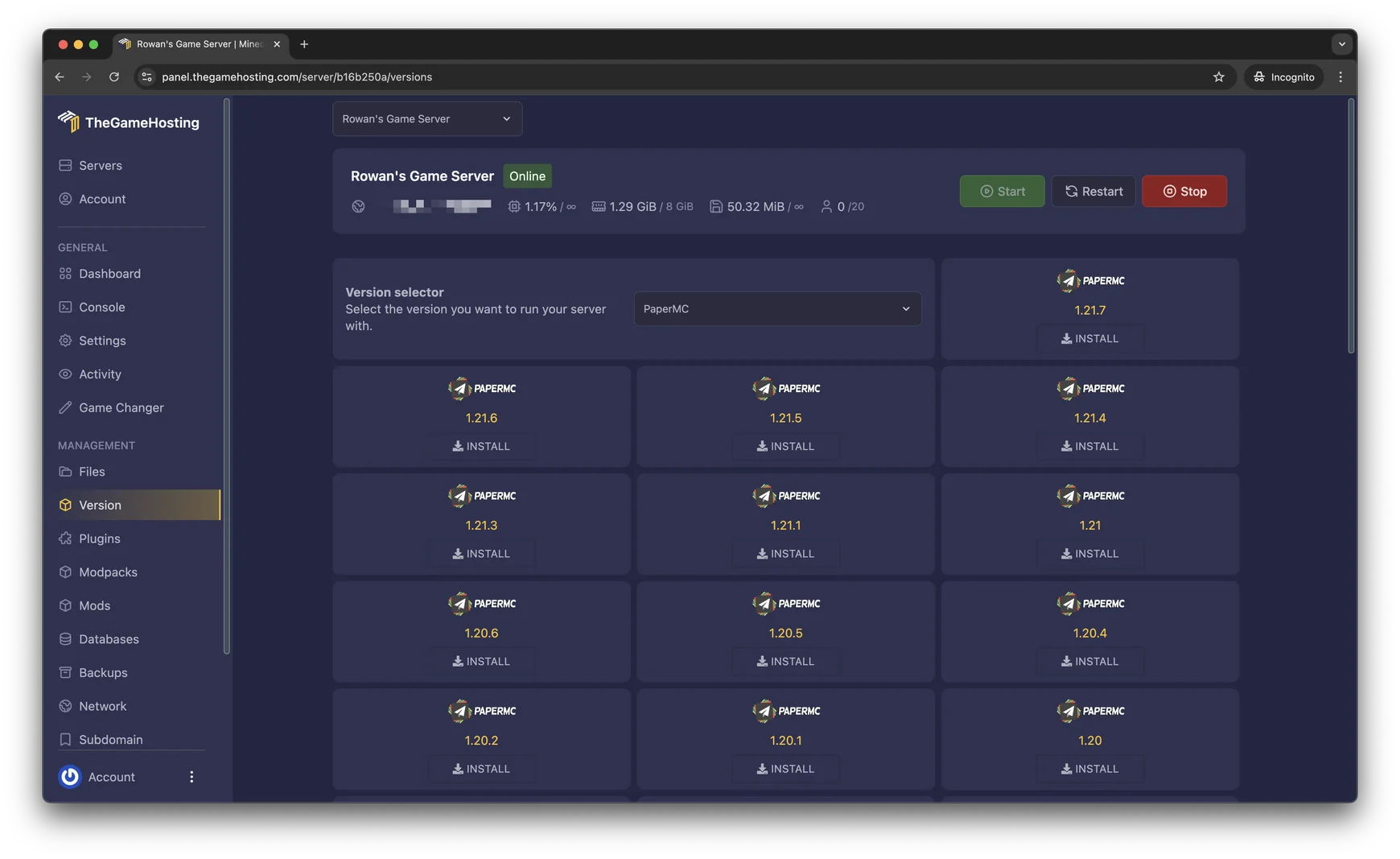
Moving between Paper and Purpur is the easy case, because both load the same plugins. Moving between a plugin platform and a mod loader means starting your add-ons again, so plan for it. When you update the server later, back up first and use the same Version Changer.
New to all this? Make a vanilla Java server first, then come back and choose your platform.
FAQ
Is Paper better than Spigot?
For most servers, yes. Paper is a fork of Spigot that adds performance work and fixes, and the PaperMC docs describe it as a drop-in replacement for both CraftBukkit and Spigot, so your plugins keep working. Spigot remains an option if one plugin only supports it.
Is Purpur better than Paper?
Purpur is built on Paper, so it keeps Paper’s plugin support and adds many more settings. It is better if you want to change gameplay options without writing a plugin. If you do not need those options, Paper is the simpler and better-documented choice.
Can I use plugins on a Fabric server?
No. Plugins are made for Bukkit-based servers such as Paper, Purpur and Spigot, and Fabric loads mods instead. Hybrid platforms such as Arclight, Mohist, Magma and Youer try to load both, and you can find them in our Version Changer.
Which software is best for a survival server with friends?
Paper with a few plugins, such as a permissions plugin and home commands, suits most friend groups, and your friends join with an unmodified game. Choose a mod loader only if you want new content and everyone is happy to install mods.
Can I switch from Paper to Fabric later?
You can change the platform, but plugins and mods do not carry over, because each platform loads its own kind of add-on. Back up first, then follow the switching steps below. A vanilla world can be opened by Paper, and the Paper docs say it converts the world for you.
Hosting for these games
 Minecraft Java hostingPaper, Purpur, Fabric, Forge and more
 Minecraft Bedrock hostingPhones, consoles and Windows
Written by TheGameHosting Team, the people who run our servers in Dallas and Amsterdam and answer your tickets.
All posts