 TheGameHosting Team
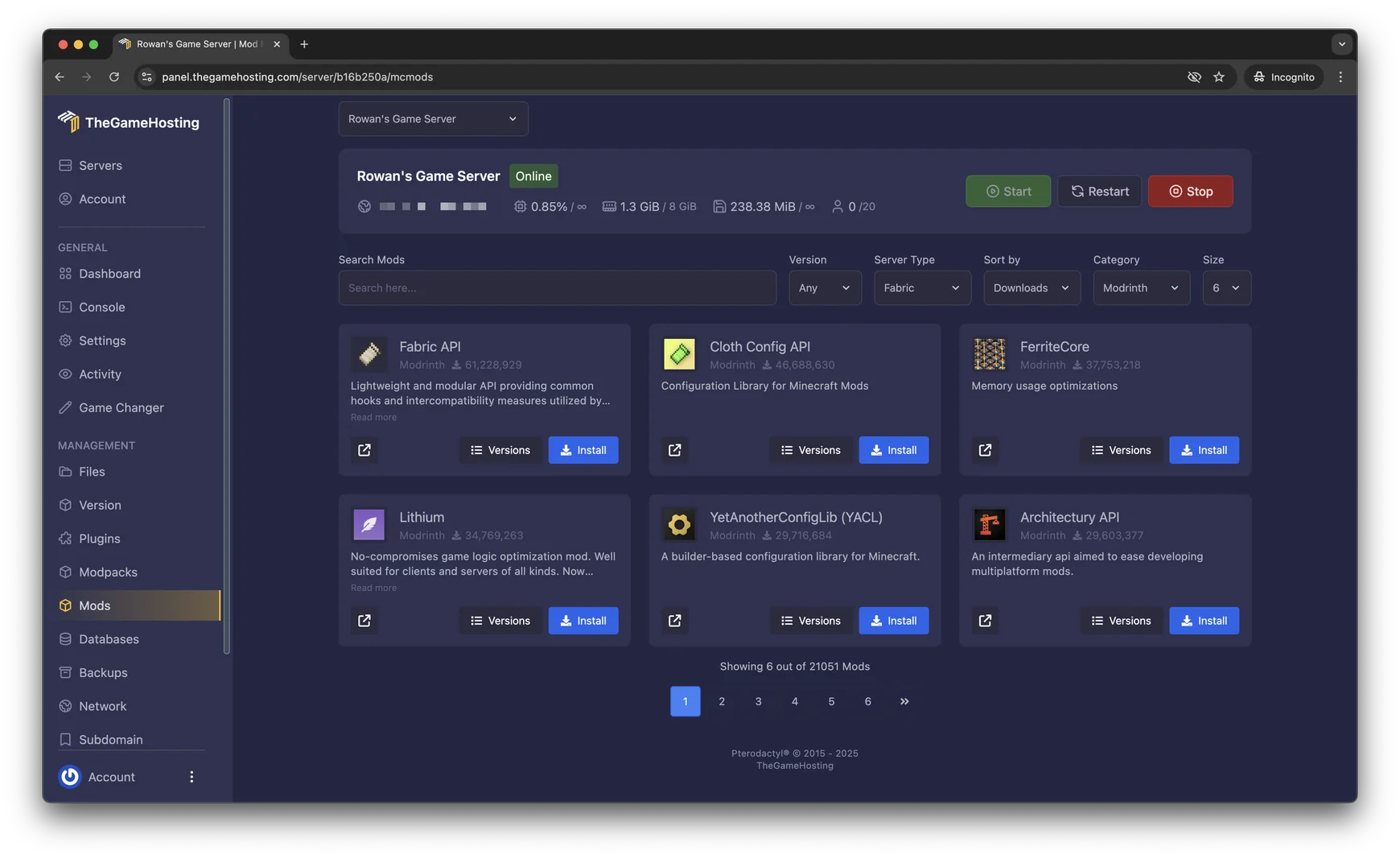
To install mods on a Minecraft server, install a mod loader on the server (Fabric, Forge or NeoForge), download mods built for that loader and your Minecraft version, put the .jar files in the server’s mods folder and restart. Your players then join with the same loader and the same mods.
The loader decides which mods you can use, so most mistakes happen in the first step. Below you will find how to choose one, how to install mods from the panel or by hand, and how to read the errors when a mod will not start.
Mods or plugins: which one do you need?
Plugins run only on the server and work on Paper, Purpur and Spigot. Players join with a normal game. Mods change the game itself with new blocks, mobs and mechanics, run on a loader such as Fabric, Forge or NeoForge, and normally have to be installed by the players too.
If you only want homes, claims or permissions, plugins are simpler: follow how to install plugins on a Paper server. If you want new content, keep reading.
Choose the mod loader first
Every mod is built for one loader and one Minecraft version. Pick the loader that your mods use, not the other way around.
| Loader | What to know |
|---|---|
| Fabric | A lightweight loader with a large catalogue of mods, including performance mods such as Lithium and FerriteCore. Most Fabric mods also need Fabric API in the mods folder. |
| Forge | The long-running loader, still used for many older mods and modpacks. |
| NeoForge | A fork of Forge, used by Forge-style mods for newer Minecraft versions. |
| Hybrids | Arclight, Mohist, Magma and Youer load mods and plugins together. They are less common, so test them before you invite players. |
Open the page of the first mod you want and note two things: the loader and the Minecraft version. Every other mod you add has to match both. If you want a ready-made list of mods that already work together, use a modpack instead and follow how to make a Minecraft modpack server.
Install mods from the TheGameHosting panel
The panel has a Mod Installer for Fabric mods from Modrinth. Install the loader first, then the mods.
- Choose Version in the side menu, pick Fabric (or Forge or NeoForge) and select the Minecraft version your mods use. Click Install.
- Choose Mods in the side menu. Set the server type to Fabric and the category to Modrinth, then filter by your Minecraft version.
- Search for Fabric API and install it first. Most Fabric mods depend on it.
- Search for the mods you want, for example
LithiumorFerriteCore, and click Install on each one. - Restart the server and watch the Console until it finishes loading.
Forge and NeoForge: upload the JARs
For Forge and NeoForge, install the loader from the Version tab as above and add the mods yourself:
- Download each mod’s
.jarfrom its Modrinth or CurseForge page, choosing the file for your loader and Minecraft version. - Open Files, go into the
modsfolder and upload the JARs. Use SFTP if you have many files. - Restart the server.

The mods folder appears after the loader has started once. If you cannot see it, start the server, let it finish loading, then stop it and look again.
Installing a modded server on your own computer
The method differs by loader. With Fabric you download the server launcher JAR for your Minecraft version from the Fabric server page and run it the way you would run server.jar. NeoForge uses an installer, as described in the NeoForged documentation:
java -jar neoforge-installer.jar --installServer
./run.sh
NeoForge’s guide says the first run shuts the server down so that you can change eula=false to eula=true in eula.txt. The memory setting lives in the generated user_jvm_args.txt. On Windows you start the server with run.bat instead. The basics of Java, the EULA and port forwarding are the same as for a vanilla server.
Get your players ready
- Tell them the loader and the exact Minecraft version.
- Give them the list of mods that run on the client. Mods that only run on the server do not need to be installed by players.
- Ask them to install the same versions of each mod, not “the latest”. A version mismatch is a common reason a player cannot join.
Each Modrinth page states whether a mod is required, optional or unsupported on the client and on the server. Read it before you decide what to hand your players.
When the server crashes after adding mods
Add mods in small batches and restart after each one, so you know which mod caused a problem. When it fails, open logs/latest.log and, if the server crashed, the newest file in crash-reports. The usual causes:
| What you see | Likely cause and fix |
|---|---|
| A missing dependency error naming another mod | Install the mod it names. For Fabric, this is very often Fabric API. |
| The mod loads on one version and fails on another | The mod was built for a different Minecraft version or loader. Download the matching build. |
| A crash that mentions client code or a rendering class | A client-only mod is on the server. Remove it from mods. |
UnsupportedClassVersionError or a Java version message | The Java version is too old for this Minecraft version. Minecraft 1.20.5 to 1.21.11 needs Java 21, and 26.1 or newer needs Java 25. |
OutOfMemoryError or the server killed at startup | The server needs more RAM. Bigger modpacks need much more than vanilla. |
If the server runs but lags, a profiler will show which mod or system is slow. Follow our Minecraft server lag fix before you buy more RAM.
Finally, be careful where you download. The Fabric documentation recommends Modrinth and CurseForge, and warns that many sites that claim to offer mods are malware sites.
FAQ
Can I run Forge mods on a Fabric server?
No. Each mod is built for one loader, so a Forge mod will not run on Fabric or NeoForge, and the reverse is also true. Check the loader and the Minecraft version on the mod page before you download it.
Do players need the same mods as the server?
Usually yes. Players join with the same loader and the same mods that the server uses, except for mods that only run on the server side. Each mod page says whether it works on the client, the server or both.
Can I use mods and plugins on the same server?
Not on plain Fabric, Forge or NeoForge, because plugins need a platform such as Paper. Hybrid platforms like Arclight, Mohist, Magma and Youer try to load both, and our Version Changer lists them. Test carefully, since mixing the two is harder to keep stable. See Paper, Purpur or Fabric for the trade-offs.
How much RAM does a modded Minecraft server need?
More than a vanilla one, and the amount grows with the number of mods and the size of the modpack. Our RAM guide gives starting points by server type, and you should check real usage check real usage once your players are on.
Where is it safe to download Minecraft mods?
The Fabric documentation points to Modrinth and CurseForge, which check that mods are what they say they are, and warns about malware sites that claim to offer mods. Do not use re-uploads from other websites.
Hosting for these games
 Minecraft Java hostingPaper, Purpur, Fabric, Forge and more
 Minecraft Bedrock hostingPhones, consoles and Windows
Written by TheGameHosting Team, the people who run our servers in Dallas and Amsterdam and answer your tickets.
All posts