 TheGameHosting Team
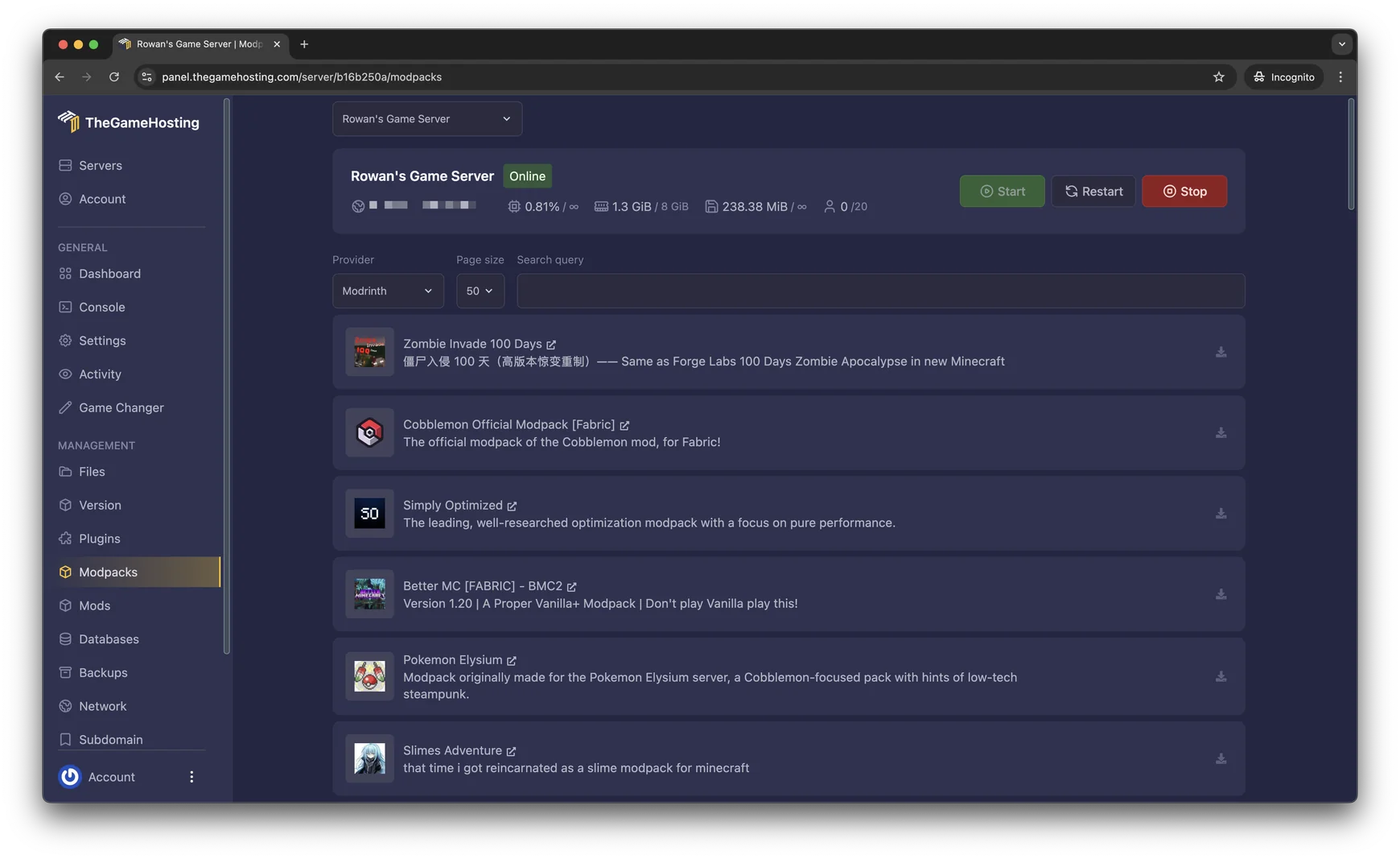
To make a Minecraft modpack server, install the modpack’s server files on a server that uses the same Minecraft version and mod loader, give it enough RAM and start it. On TheGameHosting, open Modpacks in the panel, choose a Modrinth pack and click Install. Your friends install the same pack to join.
The hard part is not the install, it is matching versions. This guide shows the one-click route, the manual route for packs you download yourself and how to fix the first crash.
What a modpack server needs
A modpack is a bundle of three things: a Minecraft version, a mod loader (Fabric, Forge, NeoForge or Quilt) and a list of mods with their settings. The server has to run the same three. Players, too, need the same pack in their own launcher.
Packs usually come in two forms. A client pack is what players install. A server pack is the same list without the mods that only work on the client. The NeoForge documentation says to use the server pack when the modpack offers one, and to install the normal pack and remove client-side mods by hand when it does not.
Modrinth packs (the .mrpack format) mark every file as required, optional or unsupported for the client and for the server. Modrinth also supports a server-overrides folder inside the pack, so the pack itself can carry the server-side settings. That is what lets an installer set up a server from a Modrinth pack without a separate download.
Install a Modrinth modpack from the panel
This is the fastest way on TheGameHosting. The Modpack Installer installs the loader, the mods and the settings for you.
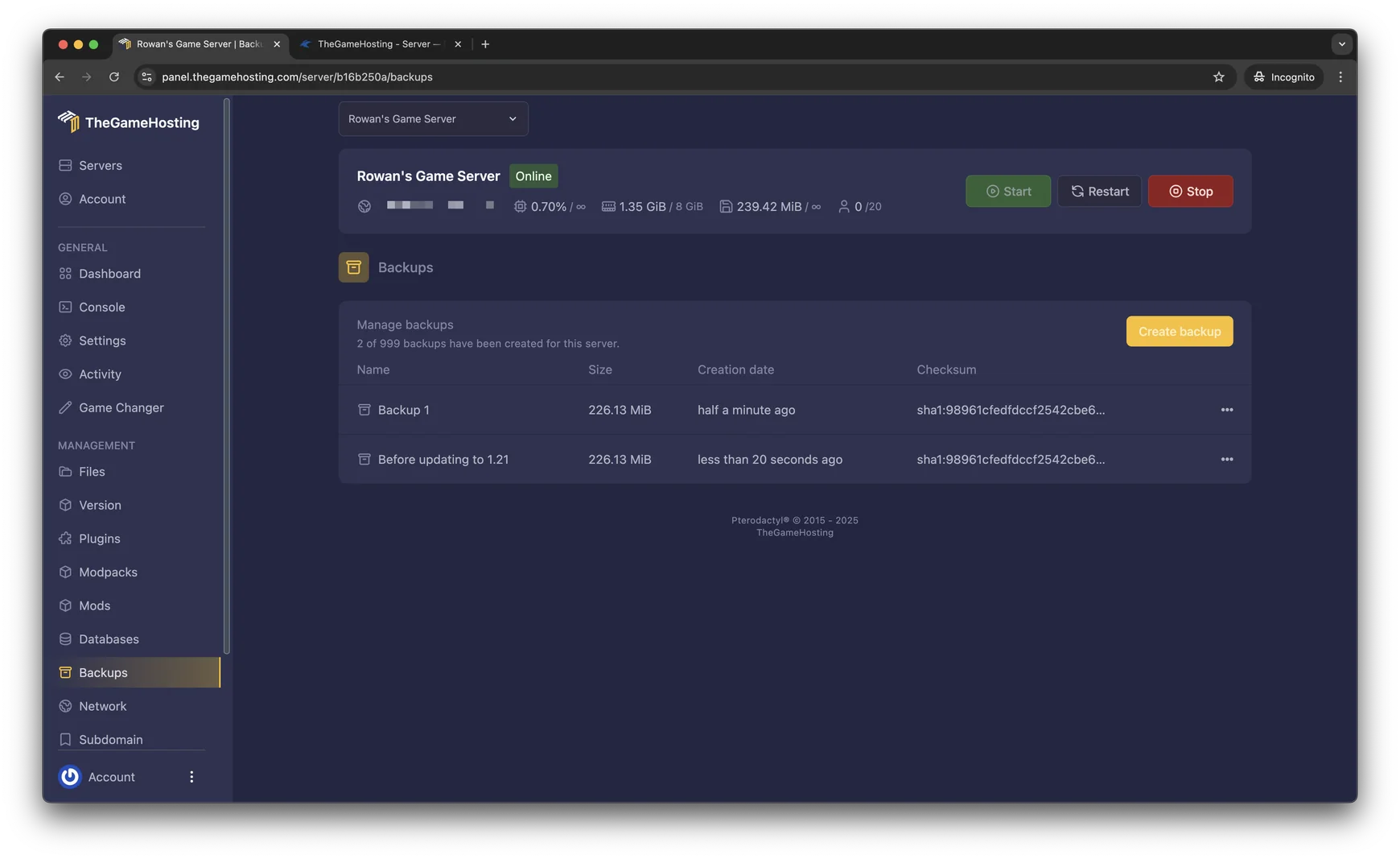
- Create a backup first. In the panel choose Backups and click Create backup, so you can go back if you change your mind.
- Choose Modpacks in the side menu and set the provider to Modrinth.
- Search for a pack, for example
Cobblemon,Simply OptimizedorBetter MC, and open it. - Click Install and wait for the installation to finish. Big packs download many files, so give it a little time.
- Press Start and watch the Console until the server reports that it is ready.
Upload a server pack yourself
Use this route for a CurseForge pack, a private pack or any pack that is not in the installer.
- Open the pack’s page and note the Minecraft version and the loader, including the loader version if it is listed.
- If the page offers a server pack, download it. If not, download the normal pack and plan to remove the client-side mods later.
- In the panel, choose Version, pick the loader (Fabric, Forge or NeoForge) and the exact Minecraft version, and click Install.
- Open Files and upload the pack contents: the
modsfolder,configand any other folders the pack includes. Use SFTP for large uploads. - Start the server. If it stops on the first run and asks you to accept the EULA, set
eula=trueineula.txtand start it again.
If you built the server from a normal pack, remove the mods that are only for the client. The NeoForge docs admit that it is not always clear which mods those are and that it often takes trial and error. Typical ones add shaders, minimaps or other visual features. Each Modrinth mod page tells you if a mod works on the server.
Check Java and RAM before you start
Two settings stop more modpack servers than anything else.
- Java version. It depends on the Minecraft version: 1.20.5 to 1.21.11 needs Java 21 and 26.1 or newer needs Java 25, according to the Minecraft Wiki.
- Memory. A pack with hundreds of mods needs far more than the 2 GB that a small vanilla server uses. Start from the amount the pack page recommends, then check usage once players join. See how much RAM a Minecraft server needs.
Our plans page lists nine sizes, from 2 GB to 64 GB, so you can pick the RAM your pack needs.
Let your players join
- Send them the pack name, the pack version and your server address.
- They install the same pack in their launcher. Modrinth and CurseForge both have their own launcher apps for this.
- They start the pack instance, choose Multiplayer and add your server address.
When the pack author releases an update, wait before you update the server. Both sides must move to the new version together, and a new version can change worlds or configs. Back up first, as described in how to update a Minecraft server without losing your world.
When the modpack server will not start
| What you see | Likely cause and fix |
|---|---|
| The server stops on the first start and asks about the EULA | Normal. Change eula=false to eula=true in eula.txt and start again. |
| A crash that mentions a mod and client code | A client-only mod is on the server. Remove that mod from mods. |
| Missing dependency or a version message | A mod does not match the loader or Minecraft version, or its library mod is missing. Compare the files with the pack page. |
OutOfMemoryError or the server killed while loading | The server needs more RAM, or another process is using it. Choose a larger plan size. |
| Players are kicked while joining | Their pack version differs from the server. Make both identical. |
Open logs/latest.log and the newest file in crash-reports: the first error often names the mod that failed. After the server runs, our lag fix guide explains how to find what makes a heavy pack slow.
FAQ
Can I run any modpack on a server?
Most packs can run on a server, but check the pack page first. It lists the Minecraft version and the mod loader, and some packs are built mainly for single player. A pack that offers a server pack is the easiest to run.
What is the difference between a server pack and a client pack?
A client pack is what players install in their launcher and includes mods that only work on the client, such as shaders or visual changes. A server pack leaves those out. If a pack has no server pack, you install the normal pack and remove the client-side mods by hand.
How much RAM does a modpack server need?
It depends on the pack. Large packs need far more memory than a vanilla server, and the pack page often lists a recommended amount. Our guide on how much RAM a Minecraft server needs shows how to size a plan, and the panel lets you check real use after you start.
Can I add extra mods to a modpack server?
Yes, but each extra mod must match the pack’s loader and Minecraft version, and your players need it too. Add one mod at a time and restart so you can spot a conflict. The steps are in how to install mods on a Minecraft server.
How do my friends join a modpack server?
They install the same modpack and the same pack version in their launcher, then connect to your server address. A different pack version is a common reason for a failed connection.
Hosting for these games
 Minecraft Java hostingPaper, Purpur, Fabric, Forge and more
 Minecraft Bedrock hostingPhones, consoles and Windows
Written by TheGameHosting Team, the people who run our servers in Dallas and Amsterdam and answer your tickets.
All posts