

Palworld

Palworld Server Hosting

Keep your Palworld world running for your whole group, even when you log off. A dedicated server holds up to 32 players, and you set the rates: experience, capture, drops and death penalty. All on AMD 9950X/7950X3D CPUs with DDR5 RAM.

  • Up to 32 players
  • Your own rates and rules
  • Scheduled restarts
  • Backups of your world

Plans from $6.96 USD / month

Palworld key art: players and Pals charging across a field, one Pal firing a gun

PalworldRequires 8 GB RAM · runs on 6 of 9 plans

What a Palworld dedicated server gives youCompared with hosting a co-op world from your own PC

  • Up to 32 playersCo-op worlds stop at 4
  • Custom ratesIn PalWorldSettings.ini
  • Always onlinePals keep working 24/7
  • Daily restartsOn a schedule you set

Use code FULL2026 at checkout for 15% off for life

Swipe or tap a plan

Slide to pick your RAM Use the arrow keys too

Every plan includes

    Your Palworld server, managed from one panel

    These are real screenshots of our panel. Edit your world settings, plan restarts and keep backups, all from the browser.

    Game Changer in the TheGameHosting panel: a grid of games such as Minecraft Bedrock Vanilla, PocketMine-MP, Nukkit, Palworld, Terraria, Project Zomboid, DayZ and PixARK, each with its RAM requirement and a Switch button

    Try the live panel demoWant to try the panel first? The demo on our home page runs in your browser.

    Everything included with your Palworld server

    The same panel and hardware on every plan. The RAM you pick is the only difference.

    Play your way

    • Up to 32 playersPalworld's dedicated server limit, with no slot cap from us.
    • Custom ratesExperience, capture rate, drops and more in the settings file.
    • Always onlineThe world keeps running when the host logs off.
    • Game ChangerSwitch the plan to another game whenever you like.

    Manage it easily

    • File manager and full sFTPEdit PalWorldSettings.ini in the browser or over sFTP.
    • Backup SystemKeep copies of your world and roll back.
    • SchedulesRestart the server daily to keep memory in check.
    • Location ChangerSwitch your world between Dallas and Amsterdam.

    Fast and protected

    • AMD 9950X/7950X3DUp to 5.7Ghz for busy bases full of Pals.
    • DDR5 RAM and NVMeDedicated DDR5 plus Samsung NVMe for quick saves.
    • DDoS protectionAttack traffic is filtered before it reaches your world.
    • Ready in 60 secondsYour Palworld world is online within 60 seconds after payment.

    A Palworld world that never logs off

    In a co-op world, the game stops when the host closes it, and only four players fit. A Palworld dedicated server runs on its own, holds up to 32 players and keeps your bases, Pals and progress waiting for whoever logs in next.

    Your server runs on AMD 9950X/7950X3D processors with DDR5 RAM and Samsung NVMe storage, sits behind DDoS protection and is ready within 60 seconds after payment. Share the address and port from the panel and your group can join.
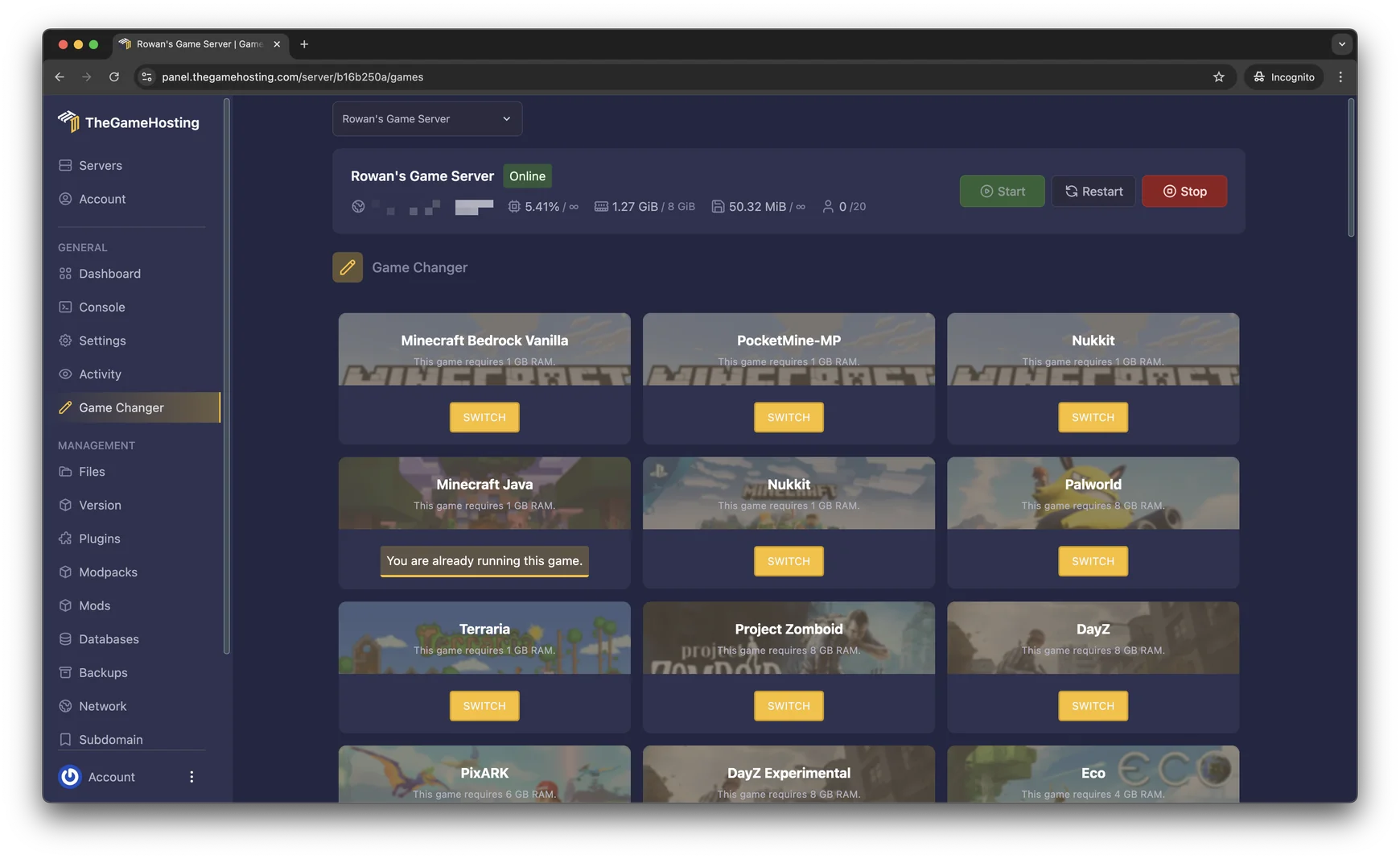

    Game Changer in the TheGameHosting panel with a Palworld card that requires 8 GB of RAM and a Switch button
    Palworld in our real Game Changer: it needs 8 GB of RAM.

    Set your own rates in PalWorldSettings.ini

    Almost everything about a Palworld server is in one file, PalWorldSettings.ini. Copy the default options into it, change the values and restart the server.

    The settings people change first

    • ExpRate, PalCaptureRate and PalSpawnNumRate for faster or slower progress.
    • DeathPenalty to choose what players drop when they fall.
    • ServerName, ServerPassword and ServerPlayerMaxNum for who can join.
    • AdminPassword to unlock admin commands in the chat.

    Edit the file in the panel's file manager or over sFTP. Make a backup before you change a running world.

    File Manager in the TheGameHosting panel listing a server's folders and files, with search, upload and new file buttons
    The file manager in our panel. Your settings file opens right in the browser.

    Restarts, saves and a healthy server

    A Palworld server uses more memory the longer it runs and the bigger your bases get. Many owners restart once a day to start fresh, and the panel's Schedules can do that for you at a quiet hour.

    • Schedule a daily restart, and a backup just before it.
    • Use admin commands such as /Save before you stop the server by hand.
    • Keep a backup from before every game update, so you can roll back if a save misbehaves.

    Moving a co-op world to the server

    You can bring a world from your own PC. The host's character is saved differently in co-op, so moving it takes a few extra steps. Our support team can walk you through it.

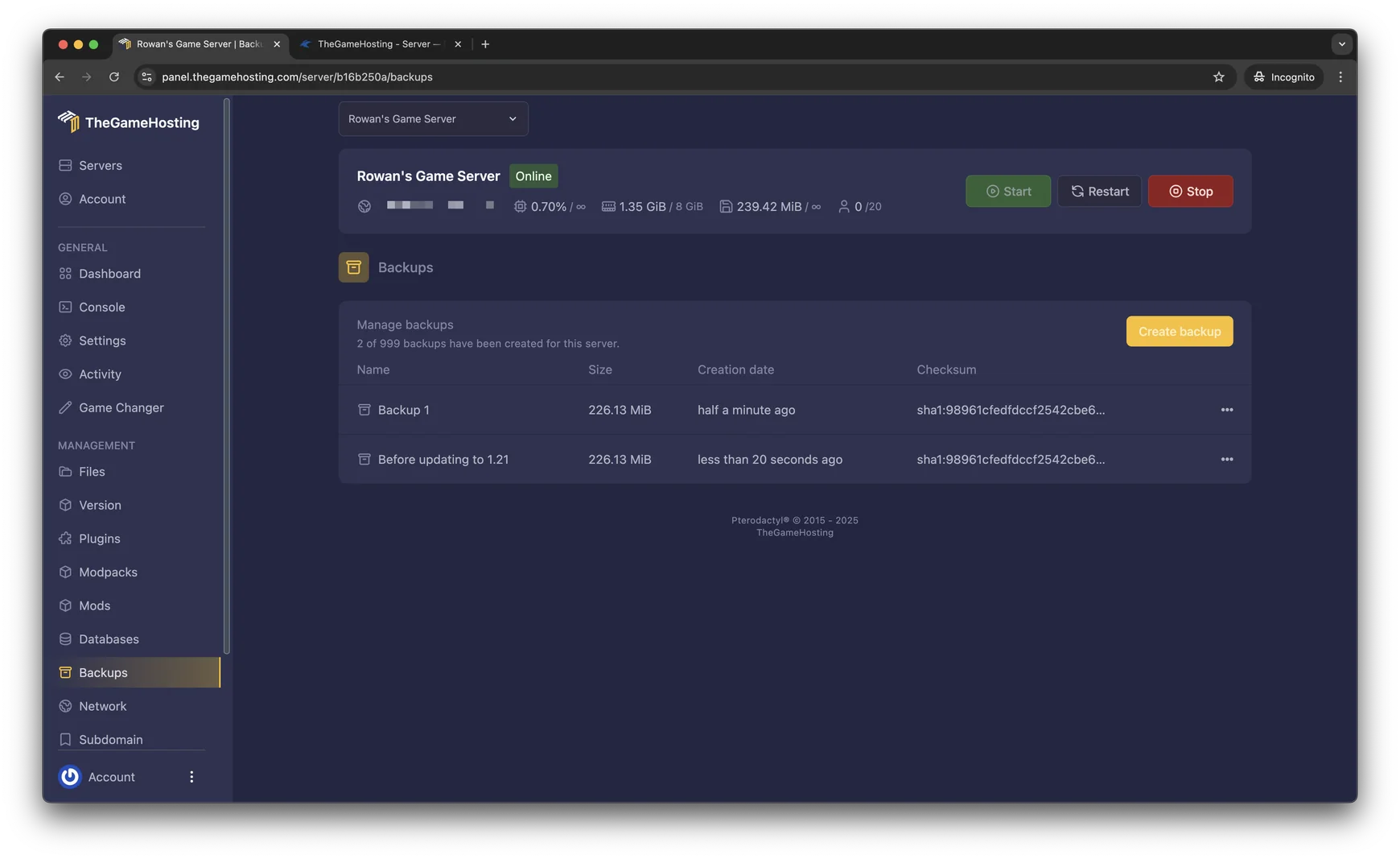
    Backups page in the TheGameHosting panel with two backups, their size, date and checksum, and a Create backup button
    Backups in our panel, ready to restore.

    Playing Palworld together

    Friends join from the game's server list with your server's address and port. Set a server password if you want to keep it to your group, or leave it open for a community.

    • A few friends catching Pals together fit well on the 8 GB plan.
    • A full server of 32 with large bases also runs on the 8 GB plan; a daily restart keeps memory in check.
    • Need a hand with settings or a stubborn save? Our support team is available 24/7/365.

    Like survival with creatures? Have a look at ARK: Survival Ascended server hosting and Valheim server hosting.

    Palworld cover art with Pals, a tower and the Palworld logo

    How much RAM does a Palworld server need?

    Palworld needs at least 8 GB of RAM on our list, so it runs on every plan from 8 GB up. The real number depends on how your world grows:

    • More players exploring different parts of the map at the same time.
    • Large bases with many Pals working, which the server has to simulate.
    • Long uptimes, since memory use climbs until the next restart.

    We don't cap slots, so RAM is what sets your ceiling. 8 GB is the right size for a Palworld server, from a small group to a full world. For the full picture, read how much RAM a Palworld server needs.

    Palworld screenshot: a player beside a pink lotus Pal at the water's edge

    Palworld requires 8 GB RAMRuns on 6 of 9 plans, from 8 GB

    • 8 GB
    • 10 GB
    • 12 GB
    • 16 GB
    • 32 GB
    • 64 GB

    Hardware we own, in Dallas and Amsterdam

    Your Palworld world runs on servers we bought and manage ourselves. Every plan uses AMD 9950X/7950X3D processors up to 5.7Ghz and DDR5 RAM, so busy bases full of working Pals stay smooth, and Samsung NVMe storage keeps saves and restarts quick.

    Your server lives in Dallas, TX (United States) or Amsterdam (Netherlands), on a 10 Gbps network backed by UPS power and advanced cooling, with DDoS protection in front of it.

    • AMD 9950X/7950X3D up to 5.7Ghz
    • DDR5 RAM
    • Samsung NVMe Storage
    • 10 Gbps Network
    • UPS Backup Power
    • Dallas, TX & Amsterdam, NL

    Real people on support

    Our team is available 24/7/365. Ask about a setting that won't stick, a co-op world you want to move or a save that won't load, and a person answers.

    • Live chat
    • Email
    • Ticket system
    Contact support

    Palworld hosting questions

    Can't find your answer? Ask our support team.

    How fast is my Palworld server ready?

    Your Palworld server is ready within 60 seconds after payment. Start it from the panel, then open PalWorldSettings.ini to set your rates before friends join.

    How many players can join a Palworld server?

    A Palworld dedicated server holds up to 32 players, set with ServerPlayerMaxNum. We don't add a slot cap of our own, so your RAM sets how many can play smoothly.

    How do I change the rates on my Palworld server?

    Edit PalWorldSettings.ini in the file manager or over sFTP. Change values such as ExpRate, PalCaptureRate or DeathPenalty, save the file and restart the server.

    How much RAM do I need for Palworld?

    Palworld needs at least 8 GB of RAM, so it runs on our 8 GB plan and everything above it. Full servers and large bases need more, and memory use grows until the server restarts. There is no slot limit, so RAM is what sets your ceiling.

    Can I move my co-op world to the server?

    Yes. Upload the world through the file manager or over sFTP. The host's character is saved differently in co-op, so it takes a few extra steps. Our support team can help.

    How do I become an admin on my server?

    Set AdminPassword in PalWorldSettings.ini, restart, then type /AdminPassword followed by your password in the game chat. Admin commands such as /Save, /KickPlayer and /BanPlayer then work for you.

    Should I restart my Palworld server every day?

    Many owners do, because memory use grows the longer the server runs. Use Schedules in our panel to restart it at a quiet hour, with a backup just before.

    Where are your Palworld servers hosted?

    In Dallas, TX (United States) and Amsterdam (Netherlands), on hardware we own in both locations. Both run AMD 9950X/7950X3D CPUs with DDR5 RAM, and the Location Changer moves your server between them.

    Do you have a discount code?

    Use promo code FULL2026 at checkout for 15% off for life.

    Is TheGameHosting affiliated with Pocketpair?

    No. TheGameHosting is an independent game server host and is not connected to Pocketpair.

    Start your Palworld server today

    Ready within 60 seconds after payment. Up to 32 players, your own rates and backups, on the same plan as every other game on our list.

    Use promo code FULL2026 at checkout for 15% off for life.